Ergonomic Keyboard Benefits: Reducing Wrist Strain
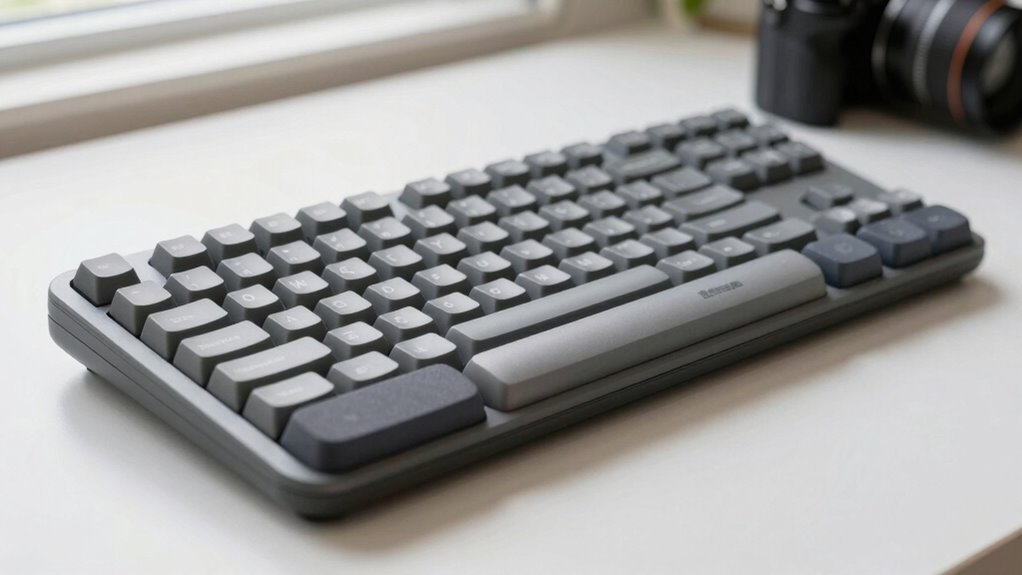
You’re slashing wrist strain with ergonomic keyboards that keep your hands happy and typing smooth—no more awkward twists or zombie wrists. Split keys, zero-degree slopes, and palm-friendly supports mean less ache, better posture, and way fewer “ouch” moments. Your forearms will feel like they just hit refresh. Think less pain, more groove, and a keyboard that finally works *with* you. Curious what else your wrists have been missing?
Aligned Key Layouts for Neutral Wrist Positions
Ever wonder why your fingers feel like they’re on a scavenger hunt every time you type?
With a columnar layout, you’re not zigzagging across mismatched rows—your keys line up straight, just like your fingers naturally want to move.
You tap keys straight up and down, not at wonky diagonal angles, which cuts out awkward wrist twists and keeps your hands happy.
Common keys land right where your fingers fall, so you’re not stretching like a pinky trying to reach the edge of a big keyboard.
Your weaker fingers get a break, and everything feels smoother, faster, easier.
Less finger racing means less fatigue, less strain, and fewer “why does my hand hate me?” moments.
It’s like giving your hands a GPS instead of a treasure map.
You stay aligned, stay comfy, and actually enjoy typing—who knew?
Your wrists stay neutral, not bent, and that’s a win every time.
This design is available through authorized retailers, so be sure to check Where to Buy for genuine products.
Reduced Ulnar Deviation With Split Designs
When you split your keyboard, you’re not just breaking up the keys—you’re giving your wrists a real shot at staying happy.
By placing each half at shoulder width, you keep your hands in line with your forearms, slashing ulnar deviation by up to 25%.
That awkward wrist tilt? Yeah, it’s mostly gone.
Studies show a sweet spot around 15° of splay (that’s fancy for “angled outward”) works best—too little and you’re still bending, too much and your elbows flare weirdly.
Lower keyboard height helps, too, keeping wrists neutral and comfy.
Adjustables beat fixed designs because, hello, we’re not all built the same!
And when you combine split, splay, and a slight tent, your wrists stay straighter, reducing strain on nerves.
Supports natural wrist and shoulder positioning to further enhance alignment and comfort throughout the workday.
Play nice with your body—it’ll thank you with fewer aches and way more typing mojo.
Minimized Wrist Extension Through Zero-Degree Slopes

Imagine this: your hands gliding across a keyboard that doesn’t make your wrists hike up like they’re climbing a tiny mountain.
With a zero-degree slope, your keyboard lies flat, keeping your wrists neutral and happy—no more awkward upward bending.
Traditional keyboards tilt upward, forcing your wrists into painful extension, but ergonomic designs eliminate that by staying level or even angling slightly downward.
Research shows this cuts wrist extension to under 15 degrees, and you can even go as low as -30 degrees for your perfect fit.
Your hands stay relaxed, your posture improves, and you type smarter, not harder.
No more “keyboard claw” cramping your style
Say goodbye to that achy, overstretched wrist feeling
Finally, a setup that works withyour body, not against it
Cushioned palm rest enhances typing comfort by supporting the natural alignment of your hands and wrists.
Lowered Muscle Activity and Forearm Fatigue
You’ve already given your wrists a break with a flat, zero-degree keyboard that keeps them happy and neutral—now let’s talk about what that means for the rest of your arms.
Your forearms get a breather too!
Studies show muscle activity drops substantially when you switch to a split or contoured design—less strain on those tiny muscles that work overtime.
Typing feels easier because your fingers aren’t fighting against awkward angles.
You’re not just moving keys around; you’re reducing fatigue with every tap.
Over hours, your muscles stay calmer, don’t wear out as fast, and recover quicker between bursts.
It’s like upgrading from hiking uphill to strolling on a sidewalk—same destination, way less burn.
Even better, your muscles aren’t tripping over each other, working together smoothly instead of clashing.
Less effort, less tiredness, more typing joy.
Who knew your forearms could clock out feeling fresh?
Decreased Risk of Carpal Tunnel and Repetitive Strain Injuries

While your split, contoured keyboard won’t magically turn you into a superhero (sorry), it does pack some serious punch when it comes to fending off carpal tunnel syndrome and other repetitive strain injuries.
You’re slashing risk just by typing in a more natural hand position—less wrist twist, less nerve squish.
Awkward, flat-keyboard postures strain tendons and crush the median nerve over time, but ergonomic designs keep everything aligned and relaxed.
Studies show symptom drops of 10–30%, especially when you pair your cool new keyboard with smart habits.
- You’re not just typing—you’re protectingyour future self from pain-filled mornings
- Imagine pain-free fingers dancing across keys, day after day, year after year
- Say goodbye to that nagging wrist buzz that’s been haunting your workday vibes
Sustained Typing Performance and Work Productivity
Even if your fingers fumble a bit at first, they’ll quickly find their groove—once you adapt, typing on an ergonomic keyboard isn’t just comfortable, it’s a productivity game-changer.
Yeah, your speed might dip at first, like learning to text with mittens, but most people bounce back in days and often type faster than before.
Accuracy? It wobbles slightly during the switch, but soon matches—and sometimes beats—your old performance.
The real win? Less fatigue.
With keys that need less push and layouts that keep your wrists neutral, your hands stay fresh during long typing marathons.
Studies show you’ll maintain speed and precision for hours, not just minutes.
Less strain means fewer mistakes caused by tired fingers or achy wrists.
And let’s be honest—when you’re not nursing sore hands, you’re just more focused, more efficient, and way more productive.
Win-win!
Enhanced Comfort With Adjustable Palm Supports

Once your palms sink into a well-designed ergonomic keyboard’s adjustable support, you’ll wonder how you ever typed without it—like swapping a park bench for a cloud.
You can tweak the height, tilt, and padding to fit your hands just right, so typing feels smooth, not strenuous.
Soft cushioning cradles your palms, breathes well, and stays put—no slipping or sweating.
With everything aligned, your wrists stay neutral, your fingers glide easily, and tension melts away.
- You’re not fighting discomfort—your hands feel rested and happy
- Every adjustment makes your workspace feel like it was made just for you
- Long typing sessions don’t leave you aching or exhausted
It’s like giving your hands a cozy, supportive hug all day.
And who doesn’t want that kind of comfort while dashing off emails or writing long reports?
Improved Forearm Circulation and Reduced Pronation
When your hands float into that sweet typing spot—thumbs up, wrists straight, and forearms happily relaxed—you’re not just typing, you’re giving your arms a backstage pass to better blood flow and less strain.
By using a split or tented keyboard, you keep your forearms from twisting inward, which means less stress on the bones and nerves running down to your hands.
That twist? It’s like a kink in a garden hose—cut it out, and everything flows smoother.
Less pronation means happier nerves, especially the median nerve, so carpal tunnel worries get quieter.
Your blood circulates better, too, because relaxed muscles don’t pinch off the supply.
No more icy fingers or that “pins and needles” drama.
You’re not just avoiding pain—you’re upgrading your whole typing groove.
Think of it as hitting refresh, but for your forearms.
Win-win!
Frequently Asked Questions
Are Ergonomic Keyboards Noisy During Typing?
Nope, ergonomic keyboards aren’t noisy little chatterboxes like some mechanical ones.
You’ll type quietly, thanks to soft membrane or scissor switches that don’t clack like drumsticks.
They’re peaceful pals for shared spaces—no angry coworkers giving side-eye.
Plus, with less force needed, you won’t slam keys like you’re mad at them.
Quiet, comfy, and kind of genius, right?
Peaceful typing all day!
Can Ergonomic Keyboards Connect Wirelessly to Devices?
Imagine zapping your keyboard to a tablet, phone, and laptop without tangled wires—like a tech-savvy magician.
Most ergonomic keyboards connect wirelessly via Bluetooth or a tiny USB receiver.
They pair smoothly with Windows, Mac, even your iPad, and some juggle four devices at once.
No more cable spaghetti, just clean, clutter-free typing—efficient, fun, and seriously cool, like your desk just upgraded to superhero status.
Do Ergonomic Keyboards Work With All Operating Systems?
Yeah, most ergonomic keyboards work with all major operating systems right out of the box—think typing on Windows, macOS, or Linux with no hassle.
Just plug in or pair up, and you’re golden.
You might lose some fancy features on certain OSes, like custom lighting or macros, but hey, at least you won’t need a decoder ring just to type your name.
Some shortcuts might act quirky, but hey, the basics always work—your thumbs will thank you!
Are Ergonomic Keyboards Suitable for Gaming?
Yes, ergonomic keyboards aren’t just for office work—they’re gaming gems too!
You get killer comfort while smashing keys during marathon sessions, and your wrists stay happy, no more zombie shuffle from desk pain.
With snappy mechanical switches, programmable buttons, and layouts that fit your hands like a glove, you’ll level up faster—both in gameplay and style.
Who knew saving the world could feel this good?
How Long Do Ergonomic Keyboards Typically Last?
They usually last 10 to 20 years, and you’d be amazed how tough they are!
With strong switches rated for 50+ million keystrokes, they’ll likely outlive your favorite desk.
You’ll see slow wear, like chattery keys, long before they quit.
Just clean them now and then, avoid spills, and they’ll stick around like that one friend who’s always up for game night—reliable, rugged, and ready.
Conclusion
You’ll type easier, feel better, and stay sharper longer with an ergonomic keyboard. Imagine slashing wrist pain like Sarah did—after six months of typing with a split, zero-degree keyboard, her numbness vanished and productivity soared. Your hands stay neutral, muscles relax, and circulation improves, all while you glide through work like a pro gamer on a winning streak. Who knew comfort could be *this* fun?