How to Adjust to a Standing Desk: Tips for Beginners
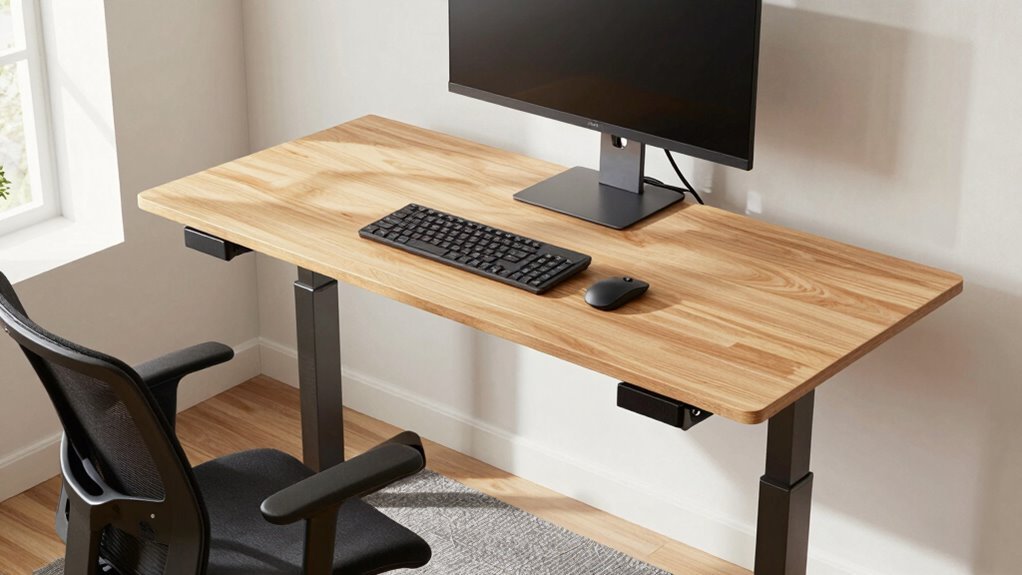
Start with your monitor at eye level and arms-length away, elbows bent at 90° while typing. Stand for just 15–30 minutes at a time at first—build up slowly like a standing desk superhero in training. Wear comfy shoes (ditch the stilettos, seriously) and use an anti-fatigue mat to keep your feet happy. Sneak in tiny movement breaks every hour—march, stretch, or grab water like it’s a mission. Your body will thank you with more energy and fewer aches, and there’s even better stuff ahead to help you thrive.
Set Up Your Desk for Optimal Ergonomics
Getting your desk dialed in right? Let’s nail the basics.
Position your monitor top at eye level or just below—your neck will thank you.
Keep it an arm’s length away (20–30 inches) so you’re not squinting or leaning like a nosy neighbor.
Dual screens? Center your main one and angle the sidekick toward it—no more neck-twirling like an owl.
Desk height? Adjust it so elbows bend at 90°, arms parallel to the floor.
Keep wrists straight while typing—no noodle wrists!
Mouse close by, same level, so you’re not stretching like you’re sneaking cookies.
Use a riser or tray to switch between sit and stand without chaos.
Tilt that screen to kill glare, boost contrast, and pick big, friendly fonts.
Feet should be hip-width apart to improve circulation and reduce lower body strain.
Stay comfy, stay sharp—you’re building a workspace that works for *you*.
Pretty cool, huh?
Build Standing Stamina With a Gradual Schedule
Start small, win big—your standing desk journey doesn’t need marathon stretches right out the gate. Begin with just 15–30 minutes of standing at a time to avoid soreness, then add 10–15 minutes each week.
Your legs will thank you!
Aim for 4–6 hours total by midday, split into chunks, not one long stretch.
Try a 30/30 sit-stand rhythm or the fun “20-8-2” rule: 20 minutes sitting, 8 standing, 2 moving—dance to the bathroom if you want.
Use timers or apps to remind you—no excuses!
Mix in calf raises, hip shifts, or mini-squats to keep things lively and your blood flowing.
If you feel achy, don’t tough it out; scale back and build smarter.
Think progress, not perfection.
Before you know it, standing will feel as natural as your morning coffee—without the jitters.
Consider using an anti-fatigue mat to reduce leg and back strain during extended standing periods.
Choose Supportive Footwear and Use an Anti-Fatigue Mat

Step into comfort like you’re walking onto a cloud that just winked at you—your feet are about to become your standing desk’s best friend. Skip the stilettos (unless you’re into slow-motion foot drama), and grab shoes with arch support, cushioning, and roomy toes. Think sneakers, clogs, or recovery slides—basically, foot huggers that mean business. Don’t forget an anti-fatigue mat; it’s like a trampoline for your tired tootsies, keeping you light on your feet. For even greater support, consider shoes with built-in arch support as they help cradle the ankles and reduce discomfort during prolonged standing.
| Footwear Type | Why It Works | Try For |
|---|---|---|
| Supportive sneakers | Cushioning + stability = all-day joy | Standing + quick kitchen dashes |
| Clogs (e.g., Dansko) | Arch love + toe freedom | Long standers needing support |
| Anti-fatigue mat | Encourages micro-movements, less ache | Any standing session over 20 min |
Stay Active With Microbreaks and Movement Variations
While your standing desk does wonders for your posture, it’s not a magic spell against stiffness—so don’t just stand there like a potted plant with a to-do list.
Shake things up every 20 to 60 minutes with quick, playful movement breaks—just 1 to 3 minutes can boost your focus, mood, and energy.
Try marching in place, rolling your shoulders, or sneaking in a victory lap around your desk. Even a tiny walk to grab water or take a standing phone call counts.
These mini-recharges cut muscle aches, sharpen your brain, and can bump performance by 12–15%.
Set a gentle reminder, link breaks to habits like finishing an email, or stash your printer across the room to trick yourself into moving.
You’ll feel more alive, think clearer, and honestly? It’s kind of fun.
Avoid Common Pitfalls for a Smoother Transition

You might be keen to dive headfirst into the standing desk lifestyle, but jumping in like you’re auditioning for a statue contest is a fast track to sore feet and burnout.
Start slow—20 to 30 minutes standing per hour—and gradually add a few minutes each week.
Rushing it? Your body will throw a protest in the form of aches and fatigue.
Check your setup: eyes level with the top of the monitor, elbows happy, hands relaxed.
Wrong height? Hello, neck pain.
Ditch the heels or flimsy slippers—cushioned shoes or an anti-fatigue mat are game-changers.
And listen to your body: soreness is normal, but sharp pain means “sit down, now.”
Move often—shift weight, stretch, avoid turning into a human plank.
Standing still too long hurts just as much as sitting.
Take it step by step, laugh at the wobbles, and you’ll stand tall—comfortably—in no time.
Frequently Asked Questions
Can I Use a Standing Desk if I’m Pregnant?
Yes, you can use a standing desk while pregnant, but you’ve gotta play it smart.
Swap between sitting and standing every15–30 minutes, pop on a comfy anti-fatigue mat, and rock supportive shoes—or go barefoot if it feels good.
Tilt your hips, ease back pain with a footrest, and keep that screen at eye level.
Listen to your body and your doctor, because you’re not just working—you’re growing a tiny human.
Teamwork makes the dream work!
Is It Normal to Feel Tired After Standing?
Yeah, you’re gonna feel tired after standing—shocker, right?
Your legs aren’t used to playing bodyguard for your whole frame all day.
They’re screaming, “What happened to sitting?!”
It’s normal, kinda hilarious, and totally temporary.
Just like breaking in new shoes, your body needs time to adapt.
Keep moving, shift your weight, and don’t turn into a statue.
Soon, you’ll stand like a pro—still not *forever*, though.
How Do I Know if My Desk Is Too High?
You’ll know your desk’s too high if your shoulders climb up toward your ears, your wrists bend downward while typing, or you’re constantly leaning back like you’re dodging a punch.
Your arms should slope gently from elbows to hands, not feel like you’re high-fiving a giraffe.
If your neck’s craning or you’re fatigued fast, it’s time to lower that desk and save your shoulders from a stand-up comedy of errors.
Can Standing Desks Help With Weight Loss?
Yeah, standing desks can help with weight loss, but don’t expect magic.
You’ll burn a few extra calories just by standing—about 54 more if you’re up six hours.
That adds up to roughly 5.5 pounds a year, kind of like sneaking in a bonus snack-free week.
It’s not a workout, but hey, every little bit fights the couch-potato battle!
Should I Stand During Meetings or Calls?
Yes, you should stand during meetings or calls—like Sarah, who swapped her afternoon slump for energy by standing during Zoom calls.
You’ll sit 59 fewer minutes a day, feel more focused, and stay energized.
Just don’t stand rigidly like a statue; shift, stretch, maybe pace a little.
Your body—and your brain—will thank you.
Standing meetings? Totally worth it.
Conclusion
You’ve got this! Start slow, listen to your body, and tweak as you go—your future self will thank you. Remember, “Rome wasn’t built in a day,” and neither is perfect desk posture. With comfy shoes, a good mat, and little movement breaks, standing feels less like work and more like a win. Keep it fun, stay steady, and soon, standing tall will feel as natural as your morning coffee. Enjoy the energy boost—it’s your body saying, “Hey, I like this!”