USB vs. XLR Microphones: A Guide for Remote Workers
You want great sound without the headache? USB mics plug right in, work instantly, and deliver 95% of the quality for calls, podcasts, or quick recordings—no extra gear needed. XLR mics need more pieces but offer studio polish and room to grow. Think of USB as your audio sidekick; reliable, simple, and always ready. Curious how to pick the one that fits your vibe and setup like a glove?
How USB and XLR Microphones Differ in Design and Function

Ever wondered why some mics plug straight into your laptop while others need a whole setup just to get going?
That’s because USB mics are like all-in-one gadgets—preamp, converter, and cable built right in. Just hook one up, and you’re chatting or recording in seconds.
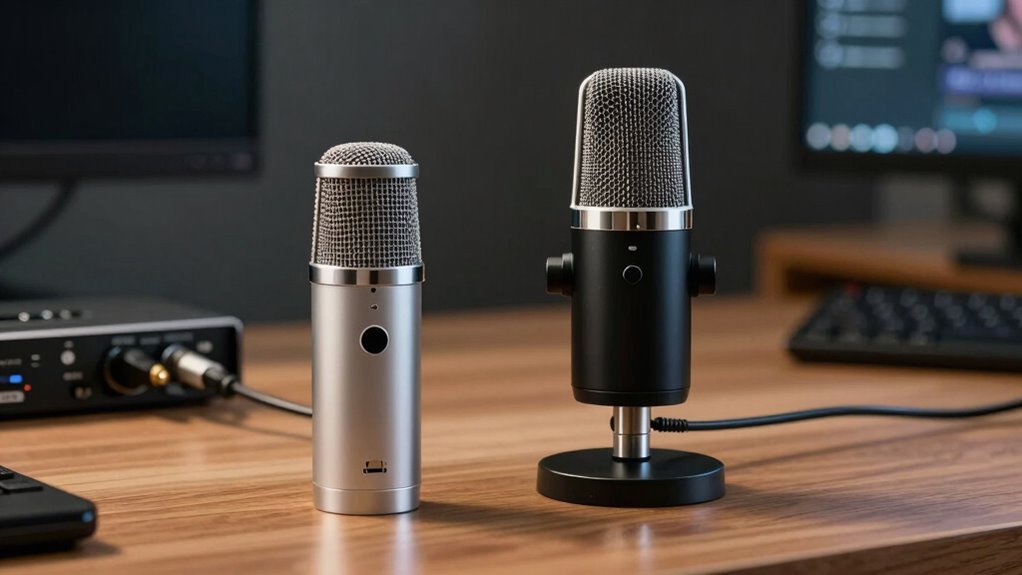
XLR mics, though, are team players—they need a mixer, interface, or preamp to shine.
Think of XLR as modular: mic, cable, and gear all working together.
USB’s great for simplicity, but it’s limited to about 16 feet before signal issues creep in.
XLR? It laughs at long cable runs, staying crisp even across a big room.
And while USB runs on your laptop’s power, XLR mics often need that +48V boost (called phantom power) to wake up.
One’s a handy sidekick, the other’s a pro squad.
Pick your audio adventure!
on-board A/D conversion enables USB mics to send digital audio directly to your device.
Audio Quality: What to Expect From Each Connection Type
You’ve seen how USB and XLR mics differ in setup and structure, but now let’s talk about what really matters—how your voice actually sounds.
USB mics are plug-and-play easy, but their audio can be a bit “flavored”—some boost bass or presence to sound warmer or clearer, which is nice until your voice starts sounding boxy or nasal.
High-end XLR mics with good preamps give you a flatter, truer sound that’s perfect for editing later.
USB mics often roll off at the extremes, while XLR captures every crisp consonant and low hum smoothly.
Need headroom when you emphasize a point? XLR usually handles loud moments better without clipping.
Some USB mics now fight back with smart tech like 32-bit floating, but budget models can get distorted fast.
And in a quiet room? XLR mics often hiss less—your audience won’t hear your coffee machine, just your brilliant ideas.
This clarity advantage is especially important if you’re recording in a quiet room context.
Setting Up Your Microphone for Remote Work Environments

Grab your mic and get ready to sound like a pro—setting up your microphone for remote work doesn’t have to be a tech headache.
First, check your ports: plug USB mics into USB-A or USB-C, and for XLR mics, make sure your interface supports phantom power if you’re using a condenser.
Use shielded cables for longer runs, and keep them short to reduce noise. If you’re using USB, a powered hub can save the day when your laptop runs out of juice.
Set your device as the default in apps like Zoom, lock audio settings to avoid surprise muting, and keep levels around -12 dBFS so you don’t clip.
Position the mic close (10–30 cm), use a pop filter, and angle it off reflective surfaces.
A quick tap and talk test before meetings? That’s your ticket to sounding clear, confident, and totally not like you’re calling from a closet.
Ensure your RDP client is configured to Enable Record from this computer if you’re using a microphone over a remote desktop connection.
Managing Multi-Mic Setups for Team Collaboration
How do you keep everyone heard when your team’s buzzing from all corners of the room—and a few corners of the Zoom grid?
You grab a multi-mic setup that keeps up.
Plug in a USB hub like Catchbox Plus or a Shure MXA array, and boom—crystal-clear audio from every voice, wired or wireless.
Space table mics evenly, or let ceiling mics catch all the chatter in larger rooms.
Wireless mics mean no tripping over cables, and systems like Microflex Wireless auto-configure so you’re not fiddling during meetings.
Use USB mixers to blend analog mics into one clean feed for Zoom or Teams.
Set your computer’s audio settings to prioritize the right input, and voilà—no more “Who said that?” moments.
Clear sound cuts the noise, reduces fatigue, and keeps remote teammates feeling like they’re right there with you.
Collaboration just got a serious upgrade—no ear strain, no chaos, just smooth, connected teamwork.
Cost Comparison: Initial Investment and Long-Term Value

What’s the real cost of sounding great on your next Zoom call?
If you’re just starting out, USB mics are your budget-friendly buddy—most cost $50 to $300 and work right out of the box. No extra gear needed!
XLR mics, while pricier alone ($80+), require even more cash for an audio interface, cable, and mount, quickly doubling or tripling your spend.
Sure, pro XLR setups offer stellar sound, but for remote work, a solid USB mic gives you 95% of the quality without draining your wallet.
Over time, XLR gear holds value better and can be upgraded piece by piece—but let’s be real, how often are you recording a rock album from home?
For most of us, USB wins on price, simplicity, and not needing a second job to afford it.
Flexibility and Upgradability in Professional Workflows
While USB mics get you up and running fast, stepping into an XLR setup is like unlocking the cheat codes for audio freedom—suddenly, you’re not stuck with one-size-fits-all gear, but building a custom vocal command center that grows with you.
Need better clarity? Swap just the preamp.
Chasing studio warmth? Pop in a boutique compressor.
You can upgrade pieces one at a time—no full rebuild needed.
Add another mic for co-hosts, plug in outboard gear for rich tone shaping, or expand with digital protocols later.
USB mics? They’re a solo act with no understudy.
But XLR lets you cast the whole crew—perfect when your podcast evolves into a talk show or your voiceover gig turns into a home studio empire.
It’s not just gear—it’s your audio LEGO set, and you’re the mad scientist.
Future-you will high-five your present self.
Portability Considerations for On-the-Go Remote Workers

Ever tried squeezing a full-size XLR mic, interface, and boom arm into your backpack alongside a sandwich and a stressed laptop? Yeah, it’s not pretty.
USB mics win on portability—compact, lightweight, and often bus-powered, so no extra batteries or chargers.
They plug right into your laptop or phone, especially handy if it’s USB-C.
Wireless lavs with fast-charging cases are sleek, too, though you’ll want spares for back-to-back meetings.
Look for rugged builds, metal bodies, and fold-flat mounts that survive daily beating.
Shock mounts cut noise on wobbly café tables, and tiny windscreens help outdoors.
Auto-pairing wireless systems? Total lifesavers when you’re rushing between spaces.
XLR’s still great for quality, but it piles on gear and setup time.
For true on-the-go ease, go simple, go light, and your bag—and back—will thank you.
Compatibility Across Devices and Software Platforms
When your next meeting pops up on three different devices and your mic only works on one, things can get awkward—fast.
USB mics save the day with plug-and-play ease on most laptops, and many even work on phones with a simple adapter.
They’re great for Zoom calls and show up right in your settings without any fuss.
But if you’re using an XLR mic, you’ll need an audio interface—no skipping that step, unless you enjoy silence during presentations.
The good news? Many modern systems support USB mics out of the box, while interfaces for XLR gear often work seamlessly too.
Hybrid mics are the ultimate multitaskers, letting you USB now and upgrade to XLR later.
Whether you’re editing in a DAW or jumping into Google Meet, picking the right mic means never scrambling for adapters—or excuses.
Reliability and Troubleshooting Common Issues

If your mic cuts out mid-presentation or starts sounding like a walkie-talkie from a haunted basement, you’re not alone—tech hiccups happen to everyone, but the good news is most of them have simple fixes.
For USB mics, try swapping cables or plugging directly into your laptop—those little dropouts often come from flaky ports or busy USB hubs.
If you’re on XLR and hearing hum, check for ground loops or faulty cables; sometimes, just unplugging extra gear helps.
Update drivers or firmware—they’re like mic vitamins.
Hear pops or stuttering? Match sample rates or lower your buffer size.
Phantom power off? Your condenser mic won’t sing.
And always test with another app—could be Zoom’s bad day, not yours.
Pro tip: XLR gear lets you swap pieces; USB mics are all-in-one, so one glitch might mean starting over.
Stay calm, check connections, and remember: even the pros deal with ghost noises.
Choosing the Right Option for Your Work Style and Goals
How do you want your mic to work for you—now and down the road?
If you’re all about simplicity and hitting record fast, a USB mic’s your go-to—just plug in and boom, you’re live.
They’re perfect for calls, solo podcasts, or quick recordings, with many delivering crisp, clear voice quality right out of the box.
But if you dream of studio-grade sound, love tweaking gear, or plan to grow into multi-person sessions or pro editing, XLR’s modular world gives you room to shine.
You can swap mics, boost quality with better preamps, and scale your setup like a pro DJ building a dream rig.
Yeah, it costs more upfront and needs a few extra boxes, but it’s an investment in sounding amazing for years.
And hey, hybrid mics let you have your cake and upgrade it too!
Frequently Asked Questions
Can I Use a USB Mic With an Audio Interface?
No, you can’t use a USB mic with an audio interface—it’s like trying to plug a toaster into a bicycle.
The mic’s built right into the USB, so it handles everything on its own.
Just plug it straight into your computer, open your DAW, and you’re good to go.
No extra gear needed, no fancy hookups.
It’s plug-and-play magic, simple and sweet—perfect for your home setup without the tech tango.
Do XLR Microphones Work With Smartphones or Tablets?
Yep, you can totally use XLR mics with your smartphone or tablet—you just need the right gear.
Grab an adapter like the iRig Pre 2 or a Focusrite interface, plug it in, and you’re golden.
Your phone sees it like a pro mic on vacation—sounding crisp, capturing every “uh-huh” and “awesome!” perfectly.
Just don’t forget to test levels first—nobody wants surprise whispers or sudden shrieks!
Are USB Microphones More Prone to Latency Than XLR?
Yeah, USB mics can be more prone to latency than XLR setups, especially if your computer’s busy or drivers aren’t great.
You’ll often feel that annoying lag when speaking or singing.
But hey, don’t panic—many USB mics fix this with zero-latency monitoring, so you hear yourself instantly.
XLR systems? They’re just smoother behind the scenes, like the secret agents of low delay—reliable, clean, and drama-free.
Can I Daisy-Chain Multiple USB Microphones on One Computer?
You can’t daisy-chain USB mics like Christmas lights, but you’ve got options.
Plug each mic directly into your computer’s USB ports—or use a hub.
On Mac, Audio MIDI Setup lets you group them into one slick package.
Windows users, grab Voicemeeter or ASIO4ALL to pull off the trick.
Just remember, syncing’s finicky, so mix mic models if you can.
It’s a juggling act, but hey, you’ve got this!
Do Hybrid Usb/Xlr Mics Sound the Same in Both Modes?
Nope, hybrid USB/XLR mics don’t sound exactly the same in both modes—you’ll notice a difference.
When you plug into XLR, you’re tapping into cleaner power and better components, so the sound’s richer and fuller.
USB mode’s still good, but it’s like comparing fresh-squeezed juice to bottled—both work, but one’s just more alive.
You’ll hear more depth, less noise, and clearer highs and lows with XLR.
Conclusion
You’ve got this, remote superstar! Did you know 73% of professionals sound clearer and more confident with an external mic? Whether you pick USB for plug-and-play ease or XLR for pro-grade sound, your voice deserves to shine. Both options boost your meetings and calls—no more “Can you repeat that?” moments. So grab your favorite headset, pick your mic, and rock that virtual workspace like the boss you are!