Tenkeyless vs. Full-Size Keyboards: Which Is Better?
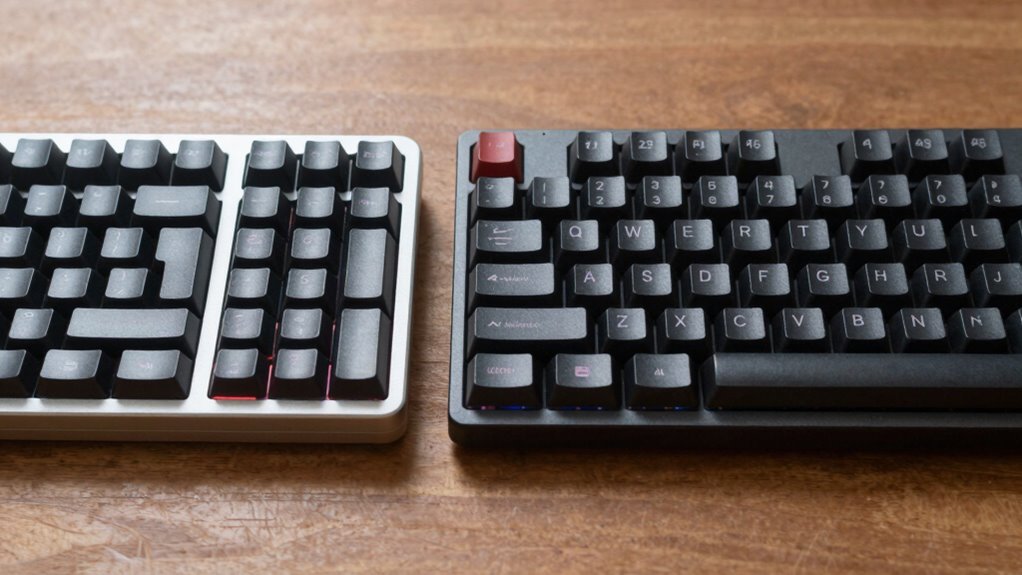
You’re trading numpad real estate for a sleeker setup with a tenkeyless keyboard—perfect if you love gaming or crave more desk space. But if you’re crunching numbers all day, full-size’s extra keys keep your workflow fast and fingers happy. Both work great, but your habits decide the winner. Think less clutter, closer mouse, or more macros? Your ideal match is just a choice away—ready to see which one fits your style?
Understanding Keyboard Layouts: Full-Size vs. Tenkeyless
While you mightn’t think a few missing keys make a big difference, switching from a full-size to a tenkeyless (TKL) keyboard is kind of like trading a minivan for a sports car—same core functions, but way more agility and style.
You’ve got your letters, arrows, and function keys right where you need them, just without the numeric keypad hogging space on the right. Full-size boards pack in ~104 keys, great if you’re crunching numbers all day, but TKL trims down to ~87, keeping everything else intact.
You’re not losing much unless you’re typing digits constantly—and even then, you can adapt. Think of it as streamlining your ride: same engine, less bulk. It’s not about cutting corners; it’s about cutting clutter. You keep what you love, lose what you rarely use, and suddenly, your setup feels snappier, sharper—like your desk just upgraded itself.
This reduced width improves mouse space and posture by allowing a more neutral arm position.
Size and Desk Space: How Much Room Do You Need?
You’re about to discover how much of your desk your keyboard is secretly hogging—turns out, that chunky full-size model might be stealing precious real estate you’d rather use for coffee, mouse acrobatics, or just breathing room.
- Full-size keyboards stretch wide (about 45 cm), pushing your mouse way out and crowding smaller desks
- TKL models save you nearly 3 inches of space, letting you type comfortably without elbowing your monitor
- On a narrow desk (under 80 cm), going tenkeyless means you’ll actually have room for your mouse to glide, not crawl
- Smaller layouts help center your typing position, which is easier on your shoulders and back during marathon sessions
- Even if you’ve got a big desk, freeing up space with a TKL gives you room to spread out, multitask, or finally fit that cute plant
- Many full-size keyboards exceed 460 mm in width due to bezel size and added features, making them bulkier than their key count alone would suggest
Portability: Which Keyboard Travels Better?

Packing up your gear? You’ll want a keyboard that won’t weigh you down. Full-size boards are the heavy hitters—averaging 0.9–1.6 kg—and often need their own pocket in your bag. TKL and smaller keyboards, on the other hand, slip in easily, weighing in at just 0.6–1.1 kg and saving precious backpack real estate. Many users find the 75% keyboard to be an ideal balance between compactness and functionality for travel.
| Feature | Full-Size | TKL / Compact |
|---|---|---|
| Weight | 0.9–1.6 kg | 0.6–1.1 kg |
| Width | 17–18 in | 11–12 in |
| Bag Fit | Tight squeeze | Slips right in |
| Travel Speed | Slow setup | Quick & easy |
Smaller keyboards mean faster setup, less clutter, and fewer travel tantrums. Choose compact, stay happy, and let your backpack breathe a little easier—your spine will thank you!
Numpad Necessity: Is Number Input a Priority?
Ever wonder why your fingers fly faster when punching numbers on a calculator than across the top row of your keyboard?
That’s the numpad magic—it’s faster, smarter, and built for number crunchers like you.
If you’re knee-deep in spreadsheets, billing, or data entry, skipping the numpad is like baking a cake without a mixer—it works, but why make it harder?
- You’ll type numbers up to 36% faster with a numpad, no sweat
- Your fingers stay put, gliding in one hand like a calculator pro
- Mistakes drop when keys are spaced right and feel solid
- Your wrist stays comfy during marathon typing sessions
- Even if you don’t need it daily, a compact numpad’s easy to grab when the numbers stack up
Turns out, that little number grid isn’t just for accountants—it’s your secret weapon for speed and sanity.
Gaming Performance: What Works Best for Gamers?

Why do so many pro gamers ditch the numpad like it’s last year’s headset? Because you’re chasing pixels, not spreadsheets.
A smaller TKL board gives you more room for wild mouse sweeps and buttery-soft aim control—perfect for sniping nooks in FPS games.
Your hands stay closer together, so flick shots feel instant and natural.
Less reach means less fatigue, too, so your aim doesn’t wobble during marathon matches.
Sure, full-size keyboards offer extra keys for macros—great for MMOs or MOBAs with tons of spells.
But for most competitive play, TKL wins with faster hand moves and cleaner desk setups.
Plus, they’re lighter and easier to lug to LANs.
At tournaments, every inch of space and millisecond counts, and TKL delivers.
You’re not losing much, but you’re gaining speed, comfort, and style.
In the game of inches, TKL’s your wingman.
Typing Efficiency: Keys Within Easy Reach
Most of the time, typing feels best when everything’s just a flick away—no acrobatics required.
With a full-size keyboard, you’ve got all your keys laid out like a buffet: numpad, arrows, functions, the works—zero shortcuts, zero stress.
But if you’re tight on desk space or hate stretching like a sleepy cat, TKL keeps the essentials within easy reach while ditching the numpad clutter.
- Full-size gives you dedicated keys so your fingers don’t play jump rope across the board
- TKL pulls the mouse closer, so you’re not launching your arm like a frisbee
- Less desk sprawl means less shoulder ache—TKL centers your setup like a pro
- Numpad lovers, rejoice: full-size keeps digits close without weird key combos
- No awkward hand hikes—both layouts keep typing smooth, fast, and mistake-free
Reach matters, and either way, you’re covered.
Customization and Keycap Compatibility

Who knew your keyboard’s personality upgrade could hinge on tiny plastic hats?
You’ve got tons of options, but here’s the twist: most keycap sets are made for full-size boards, so snagging a TKL means you’ll often end up with extra numpad keys you’ll never use.
That can feel like wasted cash—unless you grab a TKL-specific kit.
Good news? Standard profiles like Cherry or DSA fit both sizes just fine, and big keys like spacebars swap easily.
Just watch out—some tall, artsy caps might block your view or squish nearby keys on tighter TKL layouts.
Full-size lovers enjoy more color choices and faster access to new group buys, while TKL fans might wait longer or pay extra for add-ons.
Either way, mixing and matching is half the fun—your board, your rules!
Functional Trade-Offs: Missing Keys and Workarounds
You’ve picked your keycaps, maybe even gone wild with color-matched shine-through legends. but now it’s time to face the real test: can your sleek TKL keep up when the work gets tough?
- No numpad? Yep, number crunching takes a hit, but a tiny USB pad or remapping fixes that fast.
- Missing PrintScreen or ScrollLock? They’re often hiding behind a Fn combo—just a thumb tap away.
- Home, End, PgUp, PgDn crammed onto arrows? It’s like a keyboard scavenger hunt, but you’ll adapt.
- Insert and Delete playing hide-and-seek? Remap ‘em or laugh it off— muscle memory’s a quick learner.
- Fewer modifiers mess with shortcuts? QMK, AutoHotkey, or a macro pad can save the day.
Sure, you lose some keys, but with a little creativity, your TKL isn’t just sleek—it’s smart.
Ideal Use Cases for Each Keyboard Type

Where do you land when it comes to picking the right keyboard—snug and efficient or full-featured and familiar? If you’re a gamer who hates stretching across the desk, go TKL! It saves space, brings your mouse closer, and slips into your backpack like a snack. Love spreadsheets and data crunching? Full-size has your back—with a numpad, you’ll fly through numbers like a calculator ninja.
| TKL Is Best For | Full-Size Shines In |
|---|---|
| Gamers & streamers | Accountants & data pros |
| Travelers & students | Office work & macros |
| Small desks & standing setups | Heavy numpad users |
| Coding & clean setups | Multitaskers with hotkeys |
Either way, you’re covered—just pick your keyboard destiny!
Ergonomics and Long-Term Comfort Considered
While you’re smashing through emails or chasing headshots in-game, your keyboard layout might be sneaking up on your shoulders and wrists like an uninvited villain in a superhero movie.
But guess what? You’ve got a sidekick: ergonomics.
Here’s how tenkeyless (TKL) stacks up for long-term comfort:
- Better shoulder alignment: TKL brings your mouse closer, so you’re not hugging the edge of your desk like it’s a life raft.
- Less wrist drama: With shorter reaches, your hands stay neutral—no awkward crab-walking toward the mouse.
- Reduced fatigue: Fewer huge arm sweeps mean your muscles clock out less exhausted.
- Centered posture: Your arms stay near your body’s midline, keeping everything balanced and happy.
- Smarter movement: Less fidgeting, fewer micro-corrections, and more “I-can-do-this-all-day” energy.
TKL trims the clutter and the strain—your future self will high-five you.
Frequently Asked Questions
Do TKL Keyboards Cost More Than Full-Size Models?
Yeah, TKL keyboards often cost more than full-size ones, especially if they’re sleek, metal-cased, or packed with high-end features.
You’re usually paying for premium build and style, not just function.
But don’t sweat it—basic TKL models exist and can match budget full-sizes.
Meanwhile, full-size boards often win on value, especially during sales.
Think of it like sneakers: both work, but one’s just flashier out the box.
Are Full-Size Keyboards Louder Than Tenkeyless Ones?
No, full-size keyboards aren’t louder than tenkeyless ones—your switches matter way more than size.
If you’re using clicky switches, yeah, you’ll annoy coworkers, but that’s true for both layouts.
Linear switches? Quiet and smooth, perfect for late-night typing.
Foam mods and good casing cut noise in either style, so don’t sweat the size—pick what fits your desk, not your earplugs.
Can I Add a Numpad to a TKL Setup?
Yes, you can totally add a numpad to your TKL setup—no magic required!
Just grab a USB numeric keypad, or go pro with AutoHotkey or Karabiner to turn keys into a virtual numpad.
Hit Alt+number for instant numpad magic, or remap keys using software like Corsair CUE.
Some TKLs even have built-in numpads!
It’s like giving your keyboard a secret hidden talent—suddenly, spreadsheets don’t feel so scary.
Do TKL Keyboards Have RGB Lighting Options?
You bet TKL keyboards have RGB lighting—plenty of them do! Yeah, they’re smaller, but don’t let that fool you.
You’ll find vibrant per-key glows, slick underglow effects, and even customizable zones that’ll make your desk look like a cyber arcade.
Sure, battery life takes a hit if it’s wireless, but who can resist rainbow waves dancing as you type?
RGB’s alive and well on TKLs, proving cool looks don’t need extra space.
Are Full-Size Keyboards Harder to Clean?
Yeah, full-size keyboards are tougher to clean—you’ve got more keys, a numeric pad, and extra nooks where crumbs love to hide.
You’ll spend more time wiping, blowing dust out, and popping off keycaps.
More keys mean more washing, drying, and reassembling, too.
It’s like cleaning a mini apartment versus a studio.
Flip it upside down?
Still gotta tackle those tight spaces.
Bigger layout, bigger cleaning workout!
Conclusion
So, you’ve got choices, huh? Full-size keyboards: clunky, number-happy dinosaurs that hog your desk like they’re paying rent. Tenkeyless: sleek, nimble rebels for gamers and minimalists who hate reaching across continents. Need a numpad? Congratulations, you’re doing taxes or spreadsheets—live your truth! Prefer elbow room or epic LAN party speed? Go compact. Either way, your wrists, your rules—just don’t blame us when your cat claims the extra space.