Do Remote Workers Need a Dedicated Microphone?
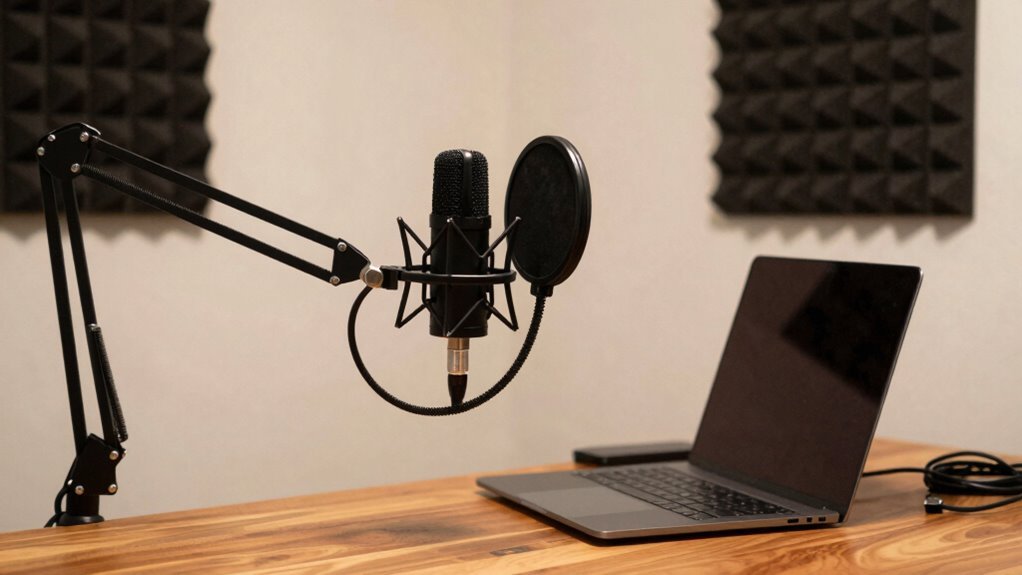
You deserve to sound as professional as you are—built-in laptop mics pick up your keyboard clacking, the dog snoring, even the fridge humming a duet. A dedicated mic cuts through the noise, giving your voice clarity and crispness that grabs attention, not distractions. You’ll sound confident, clear, and totally in control. And guess what? There’s even more to uncover about sounding your best—effortlessly.
Why Built-in Laptop Microphones Fall Short
Ever wonder why your voice sounds like it’s calling from a tin can during Zoom meetings?
That’s because your laptop’s built-in mic just isn’t cut out for clear audio.
It picks up everything—keyboard clacks, fridge hums, even your dog snoring—thanks to its oversensitive design.
You’re not imagining it; your voice *does* sound muffled, thanks to limited frequency range and low sampling rates.
Bluetooth earbuds like AirPods make it worse, capping mic input at a mere 8,000 Hz—basically phone-call quality from the ’90s.
Volume swings from too quiet to painfully loud, leaving coworkers straining or cringing.
And without noise cancellation, every background noise joins the meeting uninvited.
Honestly, it’s a minor miracle your team understands you at all.
But hey, at least the mic caught your sigh when you said, “Can everyone hear me now?”
Headsets offer the biggest bang for your buck when upgrading from a laptop mic.
The Audio Quality Edge of Standalone Microphones
You’re not stuck with the muffled, echoey sound of your laptop’s built-in mic forever—thankfully, there’s a better way.
Standalone mics like the Maono PM325 or Shure MV7 give you crisp, clear audio that makes you sound like a pro (no more “Can you repeat that?”).
They reject background noise so your dog’s barking or the AC humming won’t steal the spotlight.
With a wide frequency range, these mics catch every nuance of your voice—smooth lows, clear mids, and bright highs.
You’ll get studio-quality sound without a soundproof room.
Bonus? Pop filters and shock mounts keep plosives and desk taps at bay.
Plug in via USB or XLR, adjust settings on your phone or laptop, and boom—you’re ready.
Whether you’re pitching clients or leading a team call, you’ll sound polished, present, and perfectly professional.
Who knew sounding amazing could be so simple?
Remote workers in digital marketing & content creation benefit significantly from clear audio during client calls and podcast recordings.
When a Dedicated Mic Becomes a Necessity

When your job hinges on making a great impression, settling for choppy, muffled audio is like showing up to a job interview in pajamas—technically you’re present, but you’re already fighting an uphill battle. A dedicated mic isn’t just nice to have; it’s essential when your voice carries your credibility. Standalone microphones provide clearer, professional sound
| Situation | Why It Matters | What You Gain |
|---|---|---|
| High-stakes calls | Poor audio makes you seem unprofessional | Clear speech, stronger trust |
| Back-to-back meetings | Laptop mics tire your team’s ears | Less fatigue, better focus |
| Noisy home life | Kids, pets, and traffic steal the spotlight | Crisp voice, less chaos |
| Recordings/transcripts | Muffled words = costly errors | Accuracy you can rely on |
You’re not just speaking—you’re leading, selling, connecting. Give your voice the stage it deserves.
Best Microphone Types for Remote Work Settings
What if your next big idea didn’t get lost in a sea of static and background noise? You’ve got options. Need crisp, studio-like sound? Grab a condenser mic like the Maono PM325 or the Blue Yeti—it makes your voice sound radio-ready.
Work on the go? The Samson Go or Fifine USB mics are plug-and-play champs.
If you’re typing all day and hate cable mess, wireless picks like the Hollyland Lark M2 cancel noise like magic.
Or, if your room echoes like a cave, a dynamic mic like the PodMic laughs at background distractions.
And hey, if you’re gaming between meetings, a Sennheiser headset pulls double duty without breaking the bank.
Each mic type fits a different vibe, so you’re never stuck sounding like a robot in a tin can.
Pick your champion, and let your voice shine—clear, confident, and finally heard.
Essential Accessories for Optimal Mic Performance

A great mic is just the beginning—think of it like buying a race car and forgetting the seatbelt. You’ve got the star, but without smart accessories, your sound’s still on shaky ground.
Mount it on a boom arm so it’s always in the sweet spot, not blocking your face during Zoom calls.
Slip it into a shockmount to dodge desk bumps and keyboard thumps—because nobody needs that *thud* mid-sentence.
Toss on a pop filter to tame plosives that sound like mini explosions. Use a windscreen if your dog sneezes nearby—yep, we’ve all been there.
Drape a mic blanket or foam panel behind it to kill echo in a pinch.
Plug into a solid interface with clean power, especially if your condenser needs that +48V juice.
Keep spare cables, use closed-back headphones, and bam—your voice sounds crisp, clear, and totally in control.
Real-World Benefits From Professional Use Cases
Ever wonder why some people sound like they should be narrating nature documentaries while you’re stuck sounding like a bad phone call from 2003? Well, here’s the secret: they’re using pro mics, and it shows.
When you speak clearly, people instantly see you as smarter—like, 20% more intelligent, studies say.
No joke.
You cut through the noise, literally and figuratively, so meetings run faster and folks actually remember what you said.
Clients trust you more, pitches land better, and suddenly, you’re closing deals instead of clarifying sentences.
Your team stays in sync without yelling “What?” every two minutes, and your voice? Rich, warm, and present—like you walked into the room.
Even on back-to-back calls, your crew stays sharp, engaged, and way less tired.
Whether you’re training a team, nailing a demo, or hopping on a plane for a client meetup, good audio keeps you sounding like the pro you are—no luck required.
Creating the Ideal Audio Environment at Home

Why does your voice sound like it’s trapped in a tin can while your coworker comes through like a radio DJ from another galaxy? It’s all about your home audio environment.
You’re not just working from home—you’re broadcasting from it, too.
Seventy-two percent of remote workers’ audio happens right where you are, so why settle for soggy sound?
Toss on noise-canceling headphones—they’re a game-changer for cutting chatter and boosting clarity.
You’ve already got the basics: a desk, computer, and solid internet.
But small upgrades make a big difference.
Clear audio keeps your brain from frying, prevents misunderstandings, and cuts down on repeat questions like “Can you repeat that?”
It’s not overkill—it’s self-care.
And with 40% of remote workers jamming to music daily, make sure your mic doesn’t pick up your guilty-pleasure playlist.
Tweak your space, own your sound, and start sounding like the pro you are.
Frequently Asked Questions
Can I Use a Gaming Headset Instead of a Dedicated Mic?
Yeah, you can absolutely use a gaming headset instead of a dedicated mic—it’s super convenient and totally works for daily calls.
Just plug it in, and you’re good to go.
Sure, your voice might sound a bit squished or nasal compared to a pro mic, and your ears might get sweaty after hours, but hey, it’s comfy, it’s quick, and it saves desk space!
Do I Need a Pop Filter for My Microphone?
You don’t *have* to use a pop filter, but you’ll love how it smooths out harsh plosives and keeps your audio crisp.
It’s like a force field against “p” and “b” blasts—seriously, try saying “perfect podcast” without one!
It also shields your mic from sneaky spit.
For remote work, it’s low-cost, easy to set up, and makes you sound instantly more pro.
Trust us, your coworkers will notice.
How Do I Reduce Background Noise on Calls?
You’re already nailing clearer calls by tackling background noise like a pro.
Grab a directional mic and position it close—2 to 6 inches from your face—to focus on your voice, not the chaos behind you.
Toss on noise-canceling headphones, enable Krisp or Zoom’s built-in filter, and boom: you’ve silenced the dog’s solo and the fridge’s hum.
Mute when not talking, add a rug, and hey, your plants won’t even gossip about you anymore.
Easy, right?
Will a Better Microphone Improve My Voice Tone?
Yes, a better mic absolutely makes your voice sound richer and clearer.
You’ll get that warm, up-close podcast vibe instead of sounding like you’re in a tin can.
It grabs every smile and inflection, cuts out fuzz, and makes you sound like *you*—just upgraded.
Think of it as a selfie for your voice: sharper, more vibrant, and way more “Hey, you’ve got this!”
Can I Plug a Mic Into My Smartphone for Calls?
Yeah, you can totally plug a mic into your smartphone for calls—just match the connector to your phone’s port, like USB-C or Lightning.
If you’ve got an older mic with a 3.5mm plug, grab a TRRS adapter.
Most phones recognize mics instantly, but test it in your favorite app first.
Plug in, chat clearly, and wow your coworkers with studio-like sound from your pocket-sized office.
Boom—meeting magic!
Conclusion
You’re not just working remotely—you’re performing. And hey, 76% of professionals say clearer audio boosts meeting confidence, so why wing it with a laptop mic that sounds like a tin can? Grab a dedicated mic, cut the static, and let your voice shine. Your coworkers will thank you, your dog might audition for a podcast, and hey—suddenly, you sound like *you* again. Sweet, sweet clarity.