Inkjet vs. Laser Printers: Which Is Best for Home Use?
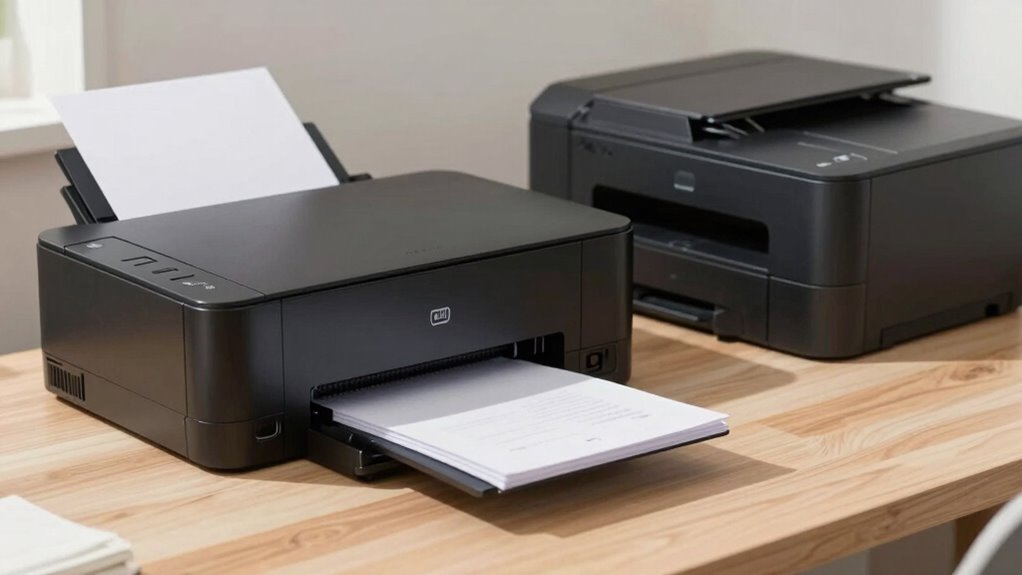
You want sharp text and fast prints? Go laser—it’s perfect for school papers and reports, zipping through pages like a pro. Need vibrant photos and creative projects? Inkjet’s your colorful buddy. Lasers save you money over time, while inkjets often cost less upfront. Think about what you’ll actually print, and you’ll see which one truly fits your home hustle. There’s more where that came from!
Text Clarity and Document Quality
If you’ve ever squinted at a printed page wondering why the letters look a little fuzzy, you’re not alone — but here’s the good news: laser printers nail text clarity every time. You’ll get sharp, crisp letters that pop right off the page, even on cheap paper. That’s because toner doesn’t bleed like ink—it sticks precisely where it should. Say goodbye to fuzzy edges or smudged reports before your big meeting.
Inkjets? They’re fun and bold, but their ink can spread, especially on standard paper, making text look a bit messy.
Lasers, on the other hand, deliver clean, professional results every time, perfect for documents you want taken seriously. Plus, no more waiting for prints to dry—you can grab them fresh off the machine and go. When it comes to text clarity and docs that impress, lasers don’t just win—they dominate. This superior precision is due to the laser-based imaging process, which ensures clean, consistent text by using a charged drum and toner fusion.
Photo and Color Print Performance
Ever wonder why your vacation photos look so flat when printed on the office laser?
That’s because inkjets crush it when it comes to color and photos.
Their liquid inks soak into specialty paper, making colors pop with rich saturation and smooth gradients.
Fancy dye or pigment inks give you vibrant hues or long-lasting prints—take your pick!
High-end photo inkjets even use extra colors like light cyan for buttery-smooth skies and sunsets.
Plus, tiny ink droplets blend tones so naturally, you’ll swear it’s a pro lab print.
Laser printers? They’re sharp for graphics but can’t match that dreamy photo depth and often show visible dots or banding.
They also struggle with glossy or textured papers—hello, smudges and uneven shine!
So if you love printing pics, inkjets are your colorful best friend.
Models like the Epson EcoTank Photo ET-8550 are specifically designed for photo enthusiasts who demand lab-quality results at home.
Why settle for “meh” when you can have “wow”?
Speed for Home Printing Tasks

How fast can your printer actually get that grocery list or school project done?
If you’re using an inkjet, you’re likely looking at 5–20 pages per minute, which is fine for a quick note or small assignment.
But if you’ve got a stack of homework or need to print everyone’s permission slips last-minute, a laser printer speeds things up, blasting out 15–50 pages per minute.
Most home lasers churn through documents at 20–40 ppm, making them perfect for busy households.
Inkjets wake up slow from standby, while lasers get going in seconds—especially newer models.
Need 30+ pages fast? The laser’s your speed demon.
Sure, inkjets start fast with no warm-up, but for larger jobs, they’ll leave you sipping coffee way too long.
When time’s tight and pages pile up, laser wins the race—hands down, no napkins needed.
Laser printers use a laser beam and fusing toner process, enabling faster continuous printing than inkjets.
Cost Per Page Over Time
Over time, your wallet will feel the difference between inkjet and laser printing—especially when you’re pumping out pages week after week.
If you’re printing black-and-white docs, laser printers save you big: just 2–5 cents per page, thanks to toner that lasts for thousands of prints.
Inkjets cost more—5 to 12 cents—because cartridges run out faster and cleaning cycles waste ink.
And if you forget to print for weeks? Dried ink means wasted money and more frequent replacements.
Color printing follows the same trend: inkjets run 15–25 cents per page, while lasers keep it down to 10–15.
Toner doesn’t dry up, so even idle printers stay efficient.
Sure, paper adds a penny or two, but it’s the ink that sneaks up on your budget.
For steady use, lasers win. You’ll print more, stress less, and keep more cash in your pocket—without playing the “ink is too expensive” blues.
Upfront Purchase Price Differences

While you might assume laser printers cost more right out of the gate—and often they do—there’s a whole pricing playground to explore once you start comparing models side by side.
You can snag a basic inkjet for as low as $50, perfect for photos or school projects, while entry-level monochrome lasers usually start around $100.
But don’t let the sticker shock scare you—features like color printing, auto-duplexing, or Wi-Fi bump prices on both types.
Supertank inkjets, like EcoTank models, cost more upfront—sometimes up to $600—but they come jam-packed with ink, saving you later.
Laser all-in-ones with office-grade perks can climb to $700, but you’re paying for speed and volume.
Brands often bait you with cheap printers just to upsell pricey ink later—classic “razor and blades,” eh?
Promotions, rebates, or refurbished deals can tip the scale, so always compare apples to apples.
Space and Design Considerations
You’ve weighed the price tags, now let’s talk real estate—how much room are you ready to give up for your printing sidekick?
If desk space is tight, inkjets are your tidy little allies, often fitting in just 14.3 x 7.3 x 2.7 inches. They’re lightweight, sleek, and slide easily onto shelves or cramped workspaces.
Need to scan, copy, or fax? All-in-one models pack everything into a small footprint.
Laser printers, though, are the bulky neighbors—some tower over 20 inches tall and chew up serious space.
Even desktop lasers demand more breathing room than most inkjets.
Want versatility without clutter? Inkjets with compact trays (50–250 sheets) keep things neat for home use.
Lasers need bigger trays and often wind up on the floor.
Wi-Fi helps hide them farther away, but face it—you’ll want your pint-sized inkjet nearby.
After all, who said practical can’t be cute?
Maintenance Needs and Longevity

If you’ve ever come back to your printer after a vacation only to find it “forgot” how to print, you’re not alone—inkjets hate being ignored, and their liquid ink dries up when left idle, clogging the tiny nozzles and turning your trusty machine into a finicky artist that smudges,
skips, or demands a cleaning cycle right when you need it most.
- Inkjets need regular printing to stay healthy, or they’ll waste ink just cleaning themselves
- Laser printers? Their toner’s a dry powder, so it doesn’t dry out—ever
- You can stash a toner cartridge for years and still fire it up like new
- Inkjet heads clog easy, especially in cheaper models you only use once in a blue moon
- Lasers laugh at long breaks and keep going strong, often outliving your old gadgets
Less fuss, more print—that’s the laser advantage.
Reliability for Occasional Use
So you’re not printing every day—maybe you only need a page here and there, like boarding passes, school forms, or that grocery list you forgot to save on your phone. When you print occasionally, reliability matters—and lasers win hands down. Inkjets? They clog up when idle, waste ink cleaning themselves, and often flake out when you actually need them. Lasers sit patiently for weeks, then fire up like they were born for the task.
| Feature | Inkjet | Laser |
|---|---|---|
| Dries during downtime | Yes, ink clogs | No, toner stays ready |
| Maintenance needed | Frequent cleaning | Almost none |
| Best for | Daily light use | Sporadic printing |
Skip the frustration—go laser, and print worry-free.
Best for High-Volume Household Printing

Most of the time, when the whole household needs to print—from school projects piling up at midnight to last-minute work presentations—you want something that won’t tap out after ten pages.
A laser printer’s your best bet when the print pile’s growing faster than your to-do list.
- You’ll blast through 20 to 75 pages a minute, while inkjets sip coffee and lag behind.
- Toner lasts longer, so you’re not swapping cartridges every other day like a drama-filled reality show.
- Crisp text? Check. Smudge-proof pages? Double check. Your reports look sharp, even at 2 a.m.
- Built-in duplexers and big paper trays mean fewer refills—because nobody’s got time to reload mid-assignment.
- High-duty cycles keep it running strong, even when the whole family’s printing last-minute handouts.
Fast, tough, and ready for chaos—lasers handle household overloads like a pro.
Ideal Use Cases by Printer Type
When you’re picking the right printer for your home, matching the machine to your mission makes all the difference—like choosing between a sports car and a pickup truck depending on whether you’re hauling toner or turning heads with photos.
If you love printing vivid family memories, inkjet’s your go-to—it handles glossy paper like a pro and makes colors pop with rich detail, perfect for photos or crafty projects.
But if your days are filled with school reports, work docs, or endless to-do lists, laser printers churn them out fast, cheap, and smudge-free.
They’re quiet, efficient, and won’t make you cry over cartridge costs.
Need something versatile? Inkjets play nice with different papers and fit snugly on small desks.
For home offices that juggle scanning, copying, and Wi-Fi sharing, all-in-one inkjets save space and hassle.
Pick your print partner based on what you actually print—because nobody wants a race car when they need a work truck.
Frequently Asked Questions
Can I Print Directly From My Smartphone With Either Printer Type?
You bet you can print straight from your smartphone with both types!
Just make sure the printer supports AirPrint or Mopria—most modern inkjets and lasers do.
Connect your phone and printer to the same Wi-Fi, or use Wi-Fi Direct for a direct link.
Tap print, and boom—no cables, no hassle.
It’s like magic, but real.
Some even work via Bluetooth or handy apps.
Seriously, it’s easier than texting your BFF.
Do Laser Printers Work Well With Glossy or Photo Paper?
You bet, laser printers handle glossy and photo paper like pros!
Just grab paper made for lasers—regular inkjet glossy paper might melt and wreak havoc.
Laser-compatible glossy paper gives you sharp, vibrant prints perfect for photos or pro-looking projects.
Crank up the “Glossy” or “Heavy Media” setting, and you’re golden.
It’s like giving your printer a photo shoot outfit—suddenly everything looks fabulous!
Are Inkjet Printers Louder Than Laser Printers During Printing?
Yes, inkjets can feel louder than lasers while printing, like a buzzing fly circling your room.
Imagine printing a photo and hearing that rapid *click-click-whir* from the printhead zipping back and forth—it’s constant, noticeable, even at 55 dB.
Lasers, on the other hand, hum in bursts—kind of like a quick chat versus a never-ending monologue.
They’re often quieter overall, especially during long jobs, so your peace stays intact.
How Often Do Laser Printers Need Calibration or Alignment?
You’ll usually see your laser printer calibrate itself every 12 to 24 hours when it’s on—kind of like it’s stretching after a nap!
It also jumps into action when you swap toner, restart, or after firmware updates.
You don’t need to babysit it, but if colors look off or things get blurry, a quick manual tune-up fixes things fast—like giving your printer a shot of espresso!
Do Supertank Inkjets Dry Out if Not Used Frequently?
Yes, supertank inkjets can dry out if you ignore them—ink loves attention!
Leave it idle for over three months, and clogged nozzles might sneak up like uninvited guests.
But hey, a quick print every few weeks keeps things fresh and flowing.
Think of it as a mini spa day for your printer—simple, effective, and way cheaper than a printhead replacement.
Stay proactive, and you’ll dodge the drama!
Conclusion
You’re like my buddy who bought a racehorse to run errands—overkill! For quick homework prints and shopping lists, laser printers sprint like champions, saving you money over time. But if you’re blasting out family photos or school projects with rainbows of color, inkjets deliver magic, not just paper. Yeah, they cost more per page—like premium coffee—but oh, that photo of your dog in a taco costume? Worth every drop. Pick your print superhero!