How to Choose the Best Speakers for Your Desk
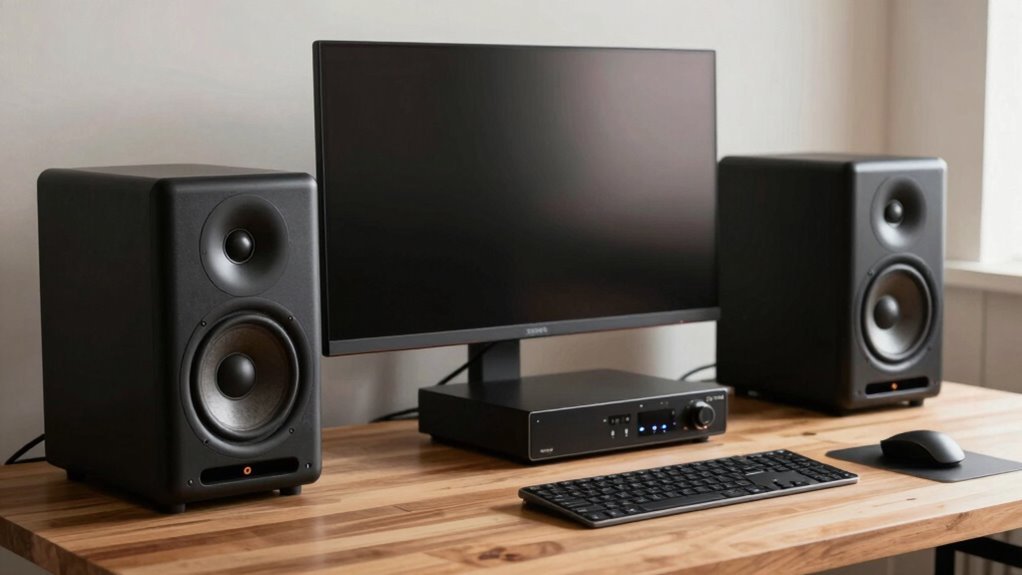
You want speakers that fit your desk and your life, not a concert hall. Start with size—tiny powerhouses like the Ruark MR1 Mk3 or Creative Pebble Plus save space but still deliver rich sound. Go 2.0 for music and calls, add a sub for drama, or level up to 5.1 for gaming thrills. Angle them toward your ears, connect via USB-C or Bluetooth, and boom—you’re golden. Your perfect pair’s waiting just around the corner.
Understanding Speaker Types and Configurations
Thinking about upgrading your sound? You’ve got options!
A 2.0 setup—just two speakers—saves space and sounds great for music and calls.
Add a subwoofer, and boom: 2.1 systems give richer bass for games and movies, though the sub needs floor room.
Craving surround-sound thrills?
5.1 systems pull you into the action, but they need more space and careful placement.
If you want simple, active speakers are your friend—built-in amps mean fewer wires and no extra gear.
Soundbars? They’re sleek, pack multiple inputs, and work double-duty for your desk or TV.
No need to overthink it—pick what fits your space and vibe.
Great sound isn’t just big boxes; it’s finding the right setup that works *for you*.
Let your ears lead the way!
Many 2.0 speakers support Bluetooth 5.0 for wireless convenience.
Matching Speaker Size to Your Desk Space
How’s your desk treating you—more command center or tight squeeze?
If you’re cramming in monitors, mugs, and maybe a sleeping cat, don’t let speakers eat up precious real estate.
Measure your space first—leave 2–4 inches behind ported speakers so bass doesn’t get stuffy.
Match small speakers (2–5.25″) to nearfield listening; they’ll image sharper and play nicer in tight quarters.
Larger drivers? Only go big if you’ve got room to breathe—both for distance and deeper cabinets.
Watch vertical clearance, too; you don’t want tweeters arguing with your monitor.
Use isolation pads to keep vibrations from rattling your coffee.
They also help angle speakers your way—better sound, no gymnastics.
And check that power outlet and amp won’t bully your setup.
Pick wisely, and your desk stays smart, sleek, and sonically satisfying—no yoga required.
Ensure the baffle cutout diameter matches your desktop panel opening for secure, flush installation.
Optimizing Placement for Best Sound Imaging

Where should you actually put your speakers for that sweet, lifelike sound?
Start by forming an equilateral triangle—you at the apex, speakers at the base—so sound arrives evenly to both ears.
Keep them 4 feet apart minimum, 2–3 feet from walls, and never tucked into corners (bass monsters hate sharing space).
If your speakers have rear ports, give them even more room to breathe.
Aim the tweeters right at your ears and toe them in slightly—like they’re whispering sweet tunes just for you.
Too much separation? Soundstage gaps.
Too close? Muddy mess.
Tweak till the center image locks in solid.
Place them along the short wall, elevate to ear level (books work in a pinch), and keep everything symmetrical.
Measurements help assess SBIR impact It’s not feng shui, but your ears will thank you.
Evaluating Frequency Response and Tonal Balance
You’ve nailed the placement—speakers out of the corners, tweeters eye-level, and that sweet triangle dialed in—now let’s talk about what those speakers are actually saying.
Humans hear from 20 Hz to 20,000 Hz, and while no speaker nails every note perfectly, you want one that comes close.
Look for a smooth, even frequency response—flat is ideal, but small boosts or dips are fine.
Big peaks? That’s like wearing sunglasses that tint one color too much.
Use measurements from the listening position to see real-world performance, and don’t trust glossy specs alone—some manufacturers spice things up.
Check the bass, mids, and treble: are they balanced, or is one shouting over the others?
Tools like ARTA help, but your ears matter most.
Smooth, natural sound wins every time—your music isn’t supposed to sound like a cartoon.
Stay curious, trust your gut, and keep it fun.
Measuring Loudness and Performance at High Volumes

Ever wonder why some speakers sound great at low volumes but turn shouty or fuzzy when you crank them up?
That’s where high-volume performance testing comes in.
Experts measure loudness using SPL and check distortion (THD) as volume increases, so you know when things start to crackle.
Sensitivity tells you how loud they’ll get with standard power, while compression tests reveal if they fizzle out during long sessions.
Testing in anechoic chambers gives clean data, but real rooms muck with results—sound doesn’t drop the same way.
They use special signals like stepped sines and pink noise to safely push speakers hard without blowing them up (oops!).
Multi-level sweeps show exactly when distortion kicks in.
So, when you blast your tunes and the neighbors complain, at least you’ll know your speakers won’t tap out.
Performance under pressure? Now you’ve got the inside scoop!
Choosing the Right Connectivity Options
How do you want to plug in—or *not* plug in—your speakers?
If you’re all about clean, modern setups, go for USB-C—it carries power and crisp digital audio in one sleek cable, perfect for MacBooks or Chromebooks.
Love using your phone or tablet? Bluetooth’s got your back, especially with snappy versions like 5.3 LE for lag-free tunes.
But if you’ve got an older PC or monitor, AUX (that trusty 3.5mm jack) still works like a charm.
For top-tier sound without interference, optical or HDMI ARC delivers rich, theater-like audio.
Some speakers, like the Onkyo GX-30ARC or LDAS A8, pack *all* these options, so switching between your laptop, console, or TV is a breeze.
Just grab a multi-input model and say goodbye to cable chaos—your desk (and your ears) will thank you.
Exploring Built-in Features for Desktop Use

Skip the extra gadgets and messy software—many desktop speakers today come packed with smart built-in features that make your life easier and your sound way better.
You’ll love how much control you have right at your fingertips, no PhD in tech needed.
Whether you’re gaming, streaming, or video calling, these features adapt to your day like a sound-savvy sidekick.
- Built-in EQ and DSP presets let you switch between music, movies, and voice with a tap—no fiddling with computer settings
- Onboard controls or remotes keep volume, inputs, and mutes within easy reach, even when your desk is a jungle of cables
- USB audio and Bluetooth give you crisp, direct connections to your laptop or phone—hello, wireless freedom
- Integrated DACs and input switching handle multiple sources smoothly, so your console, PC, and phone play nice together
- Room correction and subwoofer tuning squash weird desk booms and make bass sound balanced, not bloated
Setting a Realistic Budget and Value Priorities
Picking the right speakers doesn’t mean emptying your wallet like it’s a garage sale at a rock star’s mansion.
You can score great sound without maxing out your card—especially since the sweet spot for most people is $80–$300.
That’s where you’ll notice a real jump in clarity, bass control, and overall punch.
If you’re mostly on calls or watching videos, under $100 gets you solid voice clarity.
Gamers and movie lovers? Spend a bit more for a subwoofer or stronger lows.
Music fans dig balanced sound and Bluetooth, so mid-tier active speakers deliver big value.
Need studio-grade accuracy? Budget $300+.
But unless your ears are hyper-critical, high-end gear might be overkill.
Prioritize smart features, not just price—like USB power, easy controls, or clean mids.
Spend where it matters, and your desk (and ears) will thank you.
Selecting Based on Your Primary Use Case

What kind of sound adventure are you after?
Your daily use shapes the perfect speaker match—don’t just guess, get it right!
Whether you’re jamming to tunes, battling in games, bingeing videos, or juggling work tasks, tailor your pick to how you play (or work).
Desk space matters too, so think small but smart when squeezing in sound.
Here’s a quick guide:
- Music Lover? Go for rich, balanced audio—try AE1 Active or KEF LSX II LT.
- Gamer? Crank up the drama with Razer Leviathan V2 Pro’s 5.1 punch.
- Video Binger? Clear dialogue fans, meet Creative Pebble Plus and Ruark MR1 Mk3.
- Multimedia Juggler? Kanto ORA4 and Edifier S880db keep your mix crisp.
- Tiny Desk, Big Sound? Snap in Ruark MR1 Mk3 or Pebble Plus—angled drivers do wonders!
Match your mission, and your ears will thank you—no cape required.
Frequently Asked Questions
Can I Use Studio Monitors for Gaming and Movies?
You can totally use studio monitors for gaming and movies—they’re perfect for it!
You’ll hear every footstep, explosion, and whisper with crystal clarity.
They skip the fake bass boost, so sounds stay clean and real.
Yeah, you *might* miss rainbow lights, but who needs ‘em when your ears are treated to pure audio goodness?
It’s like upgrading from cartoon sound to cinema magic—right at your desk!
Do Speaker Stands Really Make a Difference in Sound?
Yeah, speaker stands really do make a difference—you’re not just propping up gear, you’re upgrading your sound.
Did you know proper stands can boost mix accuracy by up to 30%?
They cut reflections, kill vibrations, and position sound right at your ears.
No wobbling, no muddy bass, just clarity.
Think of them as cheat codes for audio—your speakers weren’t made to sit on desks, after all.
Stand up and hear the difference!
How Do I Reduce Speaker Vibrations on My Desk?
You *can* stop those desk vibrations—start by slipping sorbothane pads under your speakers; they’ll squash vibrations like tiny shock absorbers.
Try non-slip mats so speakers stay put and don’t “walk.”
Add a thick rug or some books on your desk to weigh it down and calm wobbly bass.
If things still rattle, tweak your EQ to cut boomy frequencies.
Boom—cleaner sound, happy desk!
Will a Subwoofer Improve My 2.0 Desktop Setup?
You bet a subwoofer’ll upgrade your 2.0 setup!
It’s not just boom—it reveals low-end details you didn’t know you were missing.
Your music’ll feel fuller, mixes’ll turn out better, and movies? They’ll shake your socks off.
Just don’t crank it till your desk does the cha-cha.
Balance it right, and you’ll wonder how you ever lived without one.
Sweet bass, zero drama—yes, please!
Are Wireless Speakers Good for Critical Audio Editing?
You can trust your ears, but not always your wireless signal—wireless speakers aren’t ideal for critical editing.
Latency and compression can mess with timing and clarity, and glitches pop up when you least expect.
Sure, some like the Edifier MR5 come close with solid specs, but if you’re editing audio tight as a drum, wired connections still win.
Skip the dropouts—go wired and edit with confidence.
Conclusion
You’ve got this! Pick speakers that fit your desk like peanut butter fits jelly—snug and satisfying. Crank them up, and boom: music spills across the room like sunshine. Imagine bass that nudges your coffee mug, highs so clear they make your cat twitch its ears. Wired or wireless, loud or mellow, the right pair feels like they were made just for you. Go ahead, let your playlist steal the show!