5 Smart Light Bulbs to Boost Office Focus & Mood (Ideal for 9-to-5)
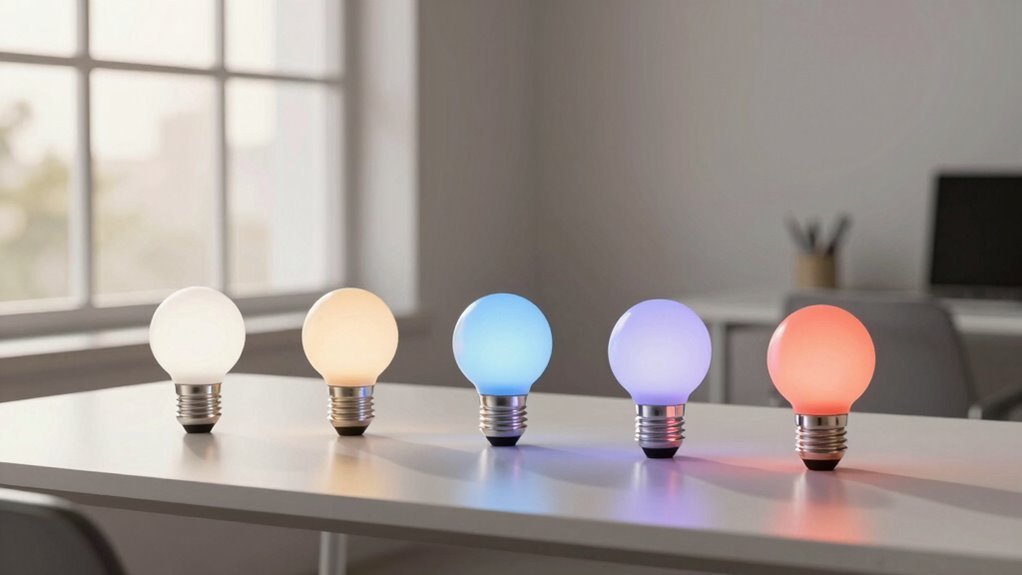
Remember how your morning started—groggy, under dim yellow light that felt more cave than coworking space?
You’re not alone.
Swapping in smart light bulbs could shift that, helping boost office focus and mood from the moment you log in.
Think 1800K amber for dawn simulation or crisp 6500K white to mirror noon sunlight, all while saving ~80% energy versus incandescents.
But which smart light bulbs actually deliver steady focus without gimmicks that drain your willpower by 2 p.m.?
| Linkind Smart LED Bulbs (4-Pack) |  | Best Overall | Voice Control: Works with Alexa, Google Assistant | WiFi Connectivity: 2.4GHz WiFi | Color Options: 16 million colors | VIEW LATEST PRICE | Read Our Analysis |
| Linkind Smart Light Bulbs 6 Pack |  | Premium Choice | Voice Control: Works with Alexa, Google Home, Apple Home, SmartThings | WiFi Connectivity: 2.4GHz WiFi | Color Options: Millions of colors | VIEW LATEST PRICE | Read Our Analysis |
| DAYBETTER Smart LED Bulbs 6 Pack |  | Budget-Friendly Pick | Voice Control: Works with Alexa, Google Home Assistant | WiFi Connectivity: 2.4GHz Wi-Fi only | Color Options: RGBCW multicolor | VIEW LATEST PRICE | Read Our Analysis |
| TJOY 4 Pack Smart Light Bulbs | 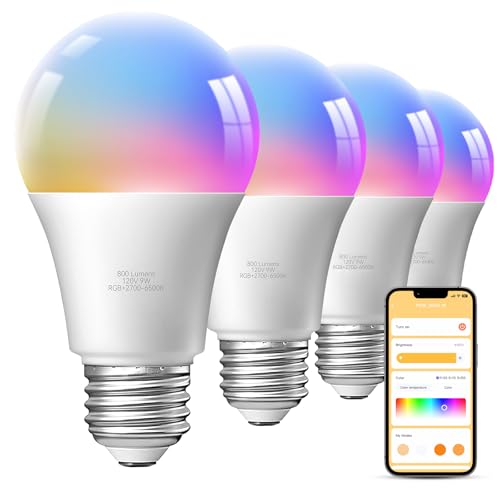 | Value Pick | Voice Control: Works with Alexa, Google Assistant | WiFi Connectivity: 2.4GHz WiFi | Color Options: 16 million RGB colors | VIEW LATEST PRICE | Read Our Analysis |
| Govee Smart RGBWW Light Bulbs (4-Pack) |  | Editor’s Choice | Voice Control: Works with Alexa, Google Assistant | WiFi Connectivity: 2.4GHz WiFi | Color Options: 16 Million DIY Colors | VIEW LATEST PRICE | Read Our Analysis |
More Details on Our Top Picks
Linkind Smart LED Bulbs (4-Pack)
If you’re the kind of person who wants full control over your workspace lighting—without shelling out for a hub or wrestling with finicky 5GHz networks—these Linkind Smart LED Bulbs are a solid pick. They run on 2.4GHz Wi-Fi and Bluetooth for faster, more stable dual-mode connectivity, though 5GHz isn’t supported during setup.
You’ll tweak brightness or color temperature—from warm 1800K to crisp 6500K—using the AiDot app, with no hub needed. These A19 bulbs deliver 800 lumens and feature E26 bases, making them easy to install and group together.
With 16 million colors, you can create any ambiance you like, from focused work to weekend relaxation. There’s even mic-activated music mode that syncs hues to your playlist—choose Party, Calm, or Auto Rhythm for instant mood shifts.
You can automate schedules and control the bulbs seamlessly, whether it’s for your daily routine or unwinding after work. Just keep in mind that Bluetooth range may be limited, so avoid controlling them from another floor.
- Voice Control:Works with Alexa, Google Assistant
- WiFi Connectivity:2.4GHz WiFi
- Color Options:16 million colors
- Music Sync:Music Sync via phone microphone
- App Control:AiDot app
- Bulb Count:4-Pack
- Additional Feature:Local control via Bluetooth
- Additional Feature:Preset scenes for ambiance
- Additional Feature:Stable 2.4GHz group control
Linkind Smart Light Bulbs 6 Pack
The Linkind Smart Light Bulbs 6 Pack brings together Matter-enabled simplicity and vibrant lighting control—ideal for office workers who want seamless automation without juggling five different apps. You can control them via Apple Home, Alexa, Google Home, SmartThings, or AiDot—no more wrestling with incompatible platforms.
With 2.4GHz WiFi (sorry, no 5GHz dreams here) and IPv6 support, these 9W bulbs—equal to 60W incandescents—offer 80% energy savings and cover about 54 ft² each. You get millions of colors, a 1800K–6500K white range, and dynamic scenes (reading, party, you name it), plus music sync that makes lights dance—fun, but is that really productivity?
Mic detection adds flair, though avoid traditional dimmers; they won’t play nice. Use the Matter or AiDot app for full control, check Feedback in AiDot if glitches pop up, and enjoy ~22 years per bulb (at 3 hours/day)—longer than most office romances last.
Remote access lets you manage power via HomeKit, saving energy (and cash) while minimizing visual fatigue—no blue-ray hazards here. Just keep your 2.4GHz WiFi stable; otherwise, good luck syncing six bulbs without a hiccup.
- Voice Control:Works with Alexa, Google Home, Apple Home, SmartThings
- WiFi Connectivity:2.4GHz WiFi
- Color Options:Millions of colors
- Music Sync:Mic/sound detection; dances to music
- App Control:AiDot APP or Matter APP
- Bulb Count:6-Pack
- Additional Feature:Matter-enabled smart control
- Additional Feature:Energy monitoring with HomeKit
- Additional Feature:22-year lifespan estimate
DAYBETTER Smart LED Bulbs 6 Pack
You’ll want these DAYBETTER Smart LED Bulbs 6 Pack if you’re serious about upgrading your workspace lighting without drowning in hubs, subscriptions, or finicky apps—because they connect straight to your 2.4GHz Wi-Fi, no middleman needed.
You can control them remotely via the Tuya app, set schedules (say, 50% brightness at 8 a.m. to ease into the day), or use voice commands through Alexa and Google—handy when your hands are full with coffee.
With 800 lumens and dimming from 1% to 100%, these 9W RGBCW bulbs offer crisp whites and soft warms (2700K–6500K), perfect for focus or wind-down hours.
You’ll group them easily, install in standard E26/E27 sockets—no electrician—though, c’mon, who still uses 60W incandescents anyway?
- Voice Control:Works with Alexa, Google Home Assistant
- WiFi Connectivity:2.4GHz Wi-Fi only
- Color Options:RGBCW multicolor
- Music Sync:Not specified
- App Control:Tuya Smart App
- Bulb Count:6-Pack
- Additional Feature:1%–100% precision dimming
- Additional Feature:Auto on/off geolocation
- Additional Feature:Tuya app remote access
TJOY 4 Pack Smart Light Bulbs
Skip the hub and still get full smart lighting control—TJOY’s 4 Pack Bluetooth WiFi LED bulbs connect directly to your 2.4GHz network. They’re ideal for office workers who want color-tuned lighting, from warm 2700K to crisp 6500K, to sharpen focus or reduce eye strain during long screen sessions.
You can control 16 million colors and adjust brightness (800 lumens, 9W = 60W) via the Daybetter app—no remote needed. The bulbs don’t support Tuya or Smartlife, but the streamlined app keeps things simple without extra clutter.
Sync the lights to music through your phone’s microphone for a midday energy boost. Or set timers for sunrise simulation and bedtime dimming to help maintain a consistent daily routine.
Group all four E26 bulbs for one-click control across rooms or workspaces. Just avoid pairing them with old dimmer switches, as that can cause performance issues.
A realistic perk is energy savings of up to 80% compared to traditional bulbs. The downside? There’s only a one-year warranty and no Home Assistant integration.
Still, with reliable 24-hour customer support, that short warranty likely isn’t a dealbreaker. For most users, the convenience and features outweigh the limitations.
- Voice Control:Works with Alexa, Google Assistant
- WiFi Connectivity:2.4GHz WiFi
- Color Options:16 million RGB colors
- Music Sync:Real-time music sync via phone microphone
- App Control:Daybetter app
- Bulb Count:4-Pack
- Additional Feature:Sunrise/sunset automation
- Additional Feature:One-year warranty included
- Additional Feature:Daybetter app integration
Govee Smart RGBWW Light Bulbs (4-Pack)
Looking for a lighting upgrade that adapts as easily to your 3 p.m. focus slump as it does to your 7 a.m. wake-up routine? Meet the Govee Smart RGBWW Light Bulbs (4-Pack)—A19 LEDs pumping out 800 lumens and 16 million colors, plus 54 preset scenes to match your mood or task.
You’ll tweak hues and brightness via the Govee Home App or voice commands (Alexa, Google Assistant), and group them for synced control over zones. With music sync—when your mic’s free—the lights dance to sound.
Set timers, sunrise wake-ups, or auto-dimming at sunset, but remember: no 5G, no smart switches, and keep that 2.4GHz Wi-Fi steady.
- Voice Control:Works with Alexa, Google Assistant
- WiFi Connectivity:2.4GHz WiFi
- Color Options:16 Million DIY Colors
- Music Sync:Music Sync via phone microphone
- App Control:Govee Home App
- Bulb Count:4-Pack
- Additional Feature:54 preset scene modes
- Additional Feature:Sunrise wake-up mode
- Additional Feature:Cluster with Govee devices
Factors to Consider When Choosing Smart Light Bulbs for Office Use

You’ll want to check if your office setup supports the smart bulbs you’re eyeing—after all, what good is a 2700K to 6500K color temperature range (perfect for shifting from cozy to focused) if your hub’s not compatible? With options spanning Wi-Fi, Zigbee, or Bluetooth connectivity, you’ve got to weigh reliability against ease of use, especially when syncing 800+ lumens across multiple rooms. And sure, voice control sounds slick (“Hey Siri, brighten up my Monday”), but is it worth it if your assistant can’t handle nuanced brightness schedules or sunset-tuned dimming?
Compatibility Requirements
Ever wonder why your smart bulb won’t connect, even though your office Wi-Fi feels lightning-fast? Chances are, it’s because most bulbs only work on 2.4GHz networks—your sleek 5GHz setup won’t cut it during pairing or daily use.
You’ll also want to check if the bulb supports Matter, since that simplifies control across Apple Home, Google Home, or Amazon Alexa ecosystems without juggling five different apps. And speaking of voice control, not all bulbs play nice with Alexa or Google Assistant, so confirm compatibility if hands-free adjustments are a must.
Some bulbs skip hubs and connect straight via Wi-Fi or Bluetooth, while others need a separate bridge—especially for grouping lights or scheduling shifts in focus lighting. Oh, and don’t assume your existing dimmer switch will work; many smart bulbs either flicker or fail entirely when paired with traditional dimmers, so plan for direct wiring instead.
Connectivity Options
Why do some smart bulbs stutter when you need them most—mid-presentation, under deadline, or during a crucial video call? It’s likely because they rely solely on 2.4GHz WiFi, a crowded band prone to interference, especially in busy office networks with dozens of connected devices.
Most smart bulbs use this frequency for direct control and local grouping—no hub needed—but lack 5GHz support, which limits speed and range. Bluetooth often backs them up, sure, but only for short-range tweaks.
If you want seamless scheduling or remote access, you’re counting on cloud connectivity, so your app must stay online. For smoother integration, consider models with Matter support: they work across ecosystems like Home, Alexa, or Google, reducing app clutter and boosting reliability.
Grouped bulbs need stable 2.4GHz signals to stay in sync, so don’t overlook your router’s placement or network load.
Color Temperature Range
How often do you consider the actual tone of light shaping your workday rhythm? You’re not alone if it’s never crossed your mind—yet color temperature (measured in Kelvins) plays a quiet but powerful role in focus and comfort.
Most smart bulbs offer 2700K–6500K, perfect for offices: warm 2700K light easing eye strain during breaks, while 5000K–6500K mimics daylight, sharpening alertness for deep work. Some go further, down to 1800K for ultra-cozy ambiance or up to 6500K for that “morning-in-April” crispness.
While RGB bulbs can fake whites, they often lack precision—true tunable white (CCT) gives you accurate, task-appropriate tones. Want peak flexibility? Pick bulbs spanning 1800K–6500K.
Just remember: more range means more control, but you’ll rarely need candlelight-level warmth at your desk.
Brightness and Lumens
One 800-lumen smart bulb—roughly as bright as a traditional 60-watt incandescent—might seem plenty, but in an office, that single source often falls short unless you’re only lighting a corner desk.
You’ll likely need multiple bulbs, since total brightness adds up when grouped—three 800-lumen bulbs give you 2,400 lumens, which better covers a full workstation or shared space.
Each bulb dims from 1% to 100%, so you can fine-tune for screen work, paperwork, or afternoon slumps without glare.
Just remember: cool white light (up to 6500K) feels brighter than warm (2700K), even at the same lumen level, thanks to higher perceived clarity.
To keep things consistent across your setup, calibrate all bulbs to match output and dimming—nobody wants one corner looking like a spotlight while the rest feels like dusk.
Is “good enough” really enough when your focus depends on it? Probably not.
Voice Control Support
While you’re juggling spreadsheets and back-to-back calls, being able to adjust your lighting without lifting a finger—much less opening an app—can be a quiet productivity win. Especially when voice-controlled smart bulbs let you dim, brighten, or switch色温 with nothing but a command.
You’ll likely use Alexa or Google Assistant, since most bulbs support them over WiFi—no hub needed—but you’ll still need the companion app for initial setup. Or a bridge, if required.
Matter-enabled bulbs are a solid play, letting you switch ecosystems without re-pairing. Though you’d be wise to check if your voice assistant actually supports all features (spoiler: not all do).
Local control via Bluetooth or 2.4GHz WiFi keeps commands running even during internet outages—but only if you’re in range. So, why assume your voice command will work flawlessly?
Test compatibility early—because “turn off” failing mid-presentation isn’t exactly a mood booster.
App Features
You’ve already set up voice control so your smart bulbs respond to commands without breaking your workflow—but let’s be honest, how often does “dim the lights” actually land right the first time?
That’s where the app steps in, giving you precise, real-time adjustments at your fingertips—on/off toggles, dimming from 1% to 100%, and color temperature tuning between 2700K (warm white) and 6500K (cool daylight) for ideal focus or relaxation.
You can group bulbs by room or function, syncing lighting across your desk, shelves, and overheads with one tap.
While music-sync modes pulse to ambient beats—fun, but overkill for spreadsheets—the real value lies in seamless access to settings voice commands often fumble.
And with Matter support, you’re not locked into one ecosystem—your bulbs play nicely with Alexa, HomeKit, or Google, reducing friction across devices.
Scheduling Capabilities
How often do your lights actually work *for* you—instead of the other way around? With smart scheduling, you can set lights to turn on at 8:00 AM sharp—matching office hours—then dim gradually by 5:30 PM to signal winding down.
You’ve got sunrise/sunset modes that mimic natural light cycles, helping teammates stay alert without jolting them awake like a 3,000-lumen alarm clock. Need focus mode at 10 AM for deep work? Schedule your bulbs to shift to cool white (5,000K) automatically.
Just remember: these tricks rely on stable 2.4GHz Wi-Fi and often tie into a specific app ecosystem—so check compatibility before betting the office vibe on a sunset-triggered glow that might flicker out mid-afternoon.
Energy Efficiency
Efficiency isn’t just a buzzword—it’s built into the circuitry of today’s smart bulbs, where a typical 9W LED (A19) delivers 800 lumens at roughly 89 lumens per watt, slashing energy use by about 80% compared to old 60W incandescents. You’re not just saving power—you’re stretching each watt for maximum visibility, thanks to high luminous efficacy that maintains brightness without the bloat.
With scheduling and automation—think timers or sunset triggers—you cut wasted runtime by turning lights off when no one’s around. Because, really, who forgets to turn off the conference room light?
Group control lets you shut down entire zones at once, so unused bulbs aren’t sipping juice in silence. These LEDs also last up to 22 years at three hours a day, drastically reducing replacement needs.
That long lifespan cuts down the hidden energy costs tied to manufacturing and disposal. Smart savings? You could say that.
Frequently Asked Questions
Can Smart Bulbs Work Without Wi-Fi Once Set Up?
Yes, smart bulbs usually work without Wi-Fi once set up. You’ve already configured schedules or routines, so they’ll follow your commands. Just keep them powered—they’ll do their thing without needing a live internet connection.
Do Smart Bulbs Use More Energy Than Regular Bulbs?
No, smart bulbs don’t use more energy than regular bulbs—you’ll actually save power with LED smart bulbs. They’re efficient, dimmable, and you control usage, cutting waste while getting the exact light you want, even when you’re not home.
Are Smart Bulbs Safe to Use in Enclosed Fixtures?
You can’t just assume smart bulbs are safe in enclosed fixtures—many aren’t. Check the specs first, or you’ll risk overheating. Using the wrong bulb might damage it or create a fire hazard. Always pick one rated for enclosed spaces.
Can I Control Smart Bulbs When I’M Not Home?
Yes, you can control smart bulbs when you’re not home. Just use the app, set up schedules, or activate voice commands through Alexa or Google. As long as they’re connected to your Wi-Fi, you’ll have full control remotely, anytime.
Do Smart Bulbs Emit Harmful Blue Light During Night Use?
No, they don’t—unless you leave them blue. At night, you can dim and shift hues, turning harsh blue into warm amber. You’re in control, so sleep stays safe and your space stays smart.
Conclusion
You’ve got better things to do than fiddle with finicky lights, so picking bulbs that run like clockwork—1800K to 6500K tuning, 800 lumens, schedules down to the minute—keeps your focus sharp and mood from flatlining. Sure, RGB effects are flashy, but when deadlines loom, steady white light’s the real MVP. Isn’t that what *working smart* really means?