5 Best Monitor Stands to Elevate Your Desk Setup in Style
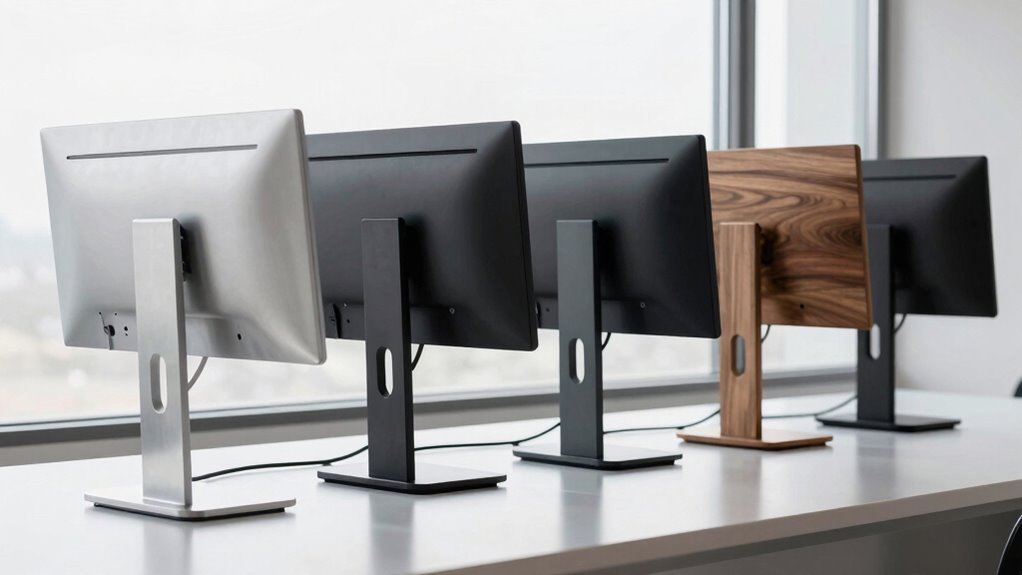
You’ve seen those sleek, minimalist desks floating online—clean, clutter-free, and somehow always lit just right.
Ever wonder what’s holding up those monitors besides a small fortune in gear?
The secret often lies in the monitor stand: not just a perch, but a pivot point for ergonomics, cable control, and workspace flow.
With options ranging from gas-spring arms to solid wood risers, picking the right monitor stand reshapes how you work—literally.
And the best choice? It’s not just about height, but how smartly it fits your screen, setup, and daily grind.
A well-chosen monitor stand enhances both comfort and productivity.
| ARES WING Dual Monitor Stand for Ultrawide |  | Best for Gamers | Load Capacity: 44 lbs per arm | Material: Industrial-grade metal with gas springs | Ergonomic Height: Up to 27.9 inches adjustable height | VIEW LATEST PRICE | Read Our Analysis |
| Fenge Dual Monitor Riser with Drawer | 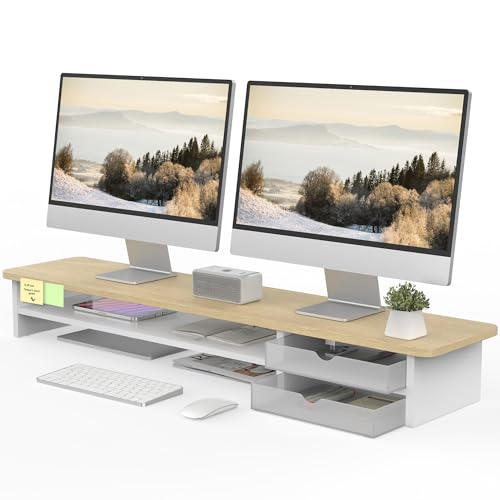 | Spacious Storage Pick | Load Capacity: 99 pounds (45 kg) | Material: FSC-certified wood and frosted acrylic | Ergonomic Height: 5.5 inches fixed height | VIEW LATEST PRICE | Read Our Analysis |
| WESTREE Dual Monitor Stand Riser | 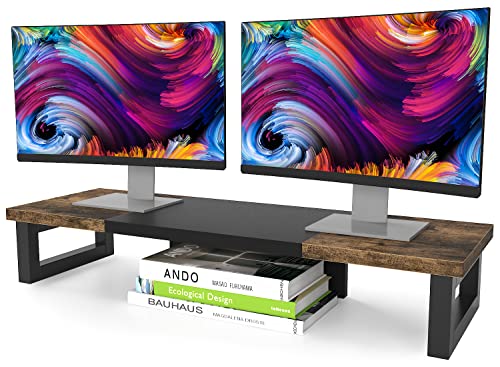 | Sturdy Industrial Build | Load Capacity: Heavy-duty, stable load bearing | Material: Wood and steel | Ergonomic Height: Designed for comfortable sight level | VIEW LATEST PRICE | Read Our Analysis |
| Hemudu 2-Pack Monitor Riser Stand |  | Minimalist Modern Design | Load Capacity: 88 pounds (maximum) | Material: Tempered glass and stainless steel | Ergonomic Height: 3.4 to 4.9 inches adjustable height | VIEW LATEST PRICE | Read Our Analysis |
| Simple Houseware Desk Dual Monitor Stand Riser with Drawer Rustic Brown |  | Ultimate Organization Hub | Load Capacity: Not explicitly stated | Material: Not explicitly stated | Ergonomic Height: 5 inches fixed height | VIEW LATEST PRICE | Read Our Analysis |
More Details on Our Top Picks
ARES WING Dual Monitor Stand for Ultrawide
If you’re juggling ultrawide monitors—say, a 49-inch beast like the Samsung Odyssey G9 or a curved LG model—then the ARES WING Dual Monitor Stand isn’t just convenient, it’s practically engineered for your specific struggle. It supports screens from 17 to 49 inches with a per-arm capacity of 44 lbs.
You’ll appreciate its gas-spring arms—tested over 20,000 times—delivering smooth tilt (-50° to +20°), swivel (±90°), and full 360° rotation without rebound. Need height adjustment? It extends up to 27.9 inches, and the arms reach out 22.4 inches for maximum flexibility.
Yeah, you’ll need a VESA adapter if your monitor lacks standard 75x75mm or 100x100mm mounting holes. But how often do you charge two devices at once? The stand includes USB-C and USB-A ports (5V/2A each), perfect for your daily routine.
Choose between a C-clamp (0.5–1.8”) or grommet (0.5–2”) for installation—either way, it’s secure and adaptable. Quick-release panels mean setup is less “read manual,” more “get it done.”
- Load Capacity:44 lbs per arm
- Material:Industrial-grade metal with gas springs
- Ergonomic Height:Up to 27.9 inches adjustable height
- Assembly Time:Quick-release panels, detailed instructions
- Storage Features:No built-in storage
- VESA Compatibility:75x75mm and 100x100mm, adapter may be needed
- Additional Feature:360° rotation capability
- Additional Feature:Integrated USB charging ports
- Additional Feature:Gas spring stability control
Fenge Dual Monitor Riser with Drawer
You’ll want the Fenge Dual Monitor Riser if your desk setup demands both seamless multitasking and smart organization—because let’s be honest, juggling two screens without clutter creeping in is easier said than done. Measuring 42.5 inches long and supporting up to 99 pounds, this FSC-certified wood stand elevates your monitors 5.5 inches for better posture.
The two frosted acrylic drawers are interchangeable and fingerprint-resistant, neatly stashing away clutter to keep your workspace clean. Non-slip pads and rounded corners enhance safety, ensuring stability and a sleek, professional look.
Assembly takes just 5–8 minutes with the included tools, making setup quick and hassle-free. Opt for the upgraded black version if you want rear cable management, or stick with the standard model, a 4.7-star favorite that’s clearly doing something right.
- Load Capacity:99 pounds (45 kg)
- Material:FSC-certified wood and frosted acrylic
- Ergonomic Height:5.5 inches fixed height
- Assembly Time:5–8 minutes
- Storage Features:Two acrylic drawers
- VESA Compatibility:Not applicable (riser, no arms)
- Additional Feature:Interchangeable acrylic drawers
- Additional Feature:Cable management plate (upgraded black)
- Additional Feature:Frosted waterproof surface
WESTREE Dual Monitor Stand Riser
Who hasn’t stared at a slouched posture in the mirror after hours hunched over a monitor—or worse, juggled two screens on a cluttered desk like a digital plate-spinner? The WESTREE Dual Monitor Stand Riser fixes that—quick (just 2 minutes to assemble), sturdy, and smart-looking with its rustic brown wood top and black steel frame.
You’ll love how it lifts both monitors (or a laptop and printer) to eye level, cutting neck strain and boosting posture. Thick steel legs keep everything rock-solid, while anti-slip pads (optional) guard against wobbles.
Underneath? Clever storage for office gear, makeup, or even pet supplies—because who doesn’t need more hidden space? It’s not just a riser; it’s a workspace upgrade, blending function, flair, and ergonomic sense without overpromising or skimping on build.
- Load Capacity:Heavy-duty, stable load bearing
- Material:Wood and steel
- Ergonomic Height:Designed for comfortable sight level
- Assembly Time:About 2 minutes
- Storage Features:Extra storage beneath stand
- VESA Compatibility:Not applicable (riser, no arms)
- Additional Feature:Rustic brown wood finish
- Additional Feature:Multi-use storage design
- Additional Feature:Pre-drilled assembly holes
Hemudu 2-Pack Monitor Riser Stand
The Hemudu 2-Pack Monitor Riser Stand isn’t just another clutter-friendly desktop accessory—it’s a precision-built solution for anyone who spends hours hunched over a screen and wonders, “Why does my neck feel like it’s auditioning for a chiropractor ad?” With its height-adjustable design (ranging from 3.4 to 4.9 inches) and a sturdy 88-pound load capacity per unit, these risers deliver real ergonomic gains by lifting your monitor or laptop to eye level, slashing neck and back strain like a covert wellness upgrade.
You get two sleek stands made of 1/4-inch tempered glass and stainless steel legs—durable, easy to clean, and rated for everything from monitors to your Xbox One. At 14.6 x 9.1 inches, each platform offers ample space while letting you stash your laptop underneath to save desk real estate.
The tilt function (0–15 degrees forward) fine-tunes viewing comfort, and though they weigh over six pounds each, the squared base stays stable without wobble. With an overwhelming 4.8-star average from over 8,000 reviews and a #21 Amazon bestseller rank since 2018, this isn’t just popular—it’s proven.
- Load Capacity:88 pounds (maximum)
- Material:Tempered glass and stainless steel
- Ergonomic Height:3.4 to 4.9 inches adjustable height
- Assembly Time:Not explicitly stated
- Storage Features:Stow laptop underneath
- VESA Compatibility:Not applicable (riser, no arms)
- Additional Feature:Tilt function included
- Additional Feature:Tempered glass surface
- Additional Feature:Stow laptop underneath
Simple Houseware Desk Dual Monitor Stand Riser with Drawer Rustic Brown
Need a clutter-conquering, ergonomically sound solution that actually fits on a real desk—say, one already crammed with a mechanical keyboard, a perpetually half-charged phone, and three mismatched pens? The Simple Houseware Dual Monitor Stand Riser (Rustic Brown) elevates both screens and your sanity—measuring 33.3W x 10.9D x 5H (extends to 45W), it fits snugly while holding dual monitors or a laptop plus gear.
Its USPTO-patented design (USD1048783S1) includes a slide-out drawer with 6 removable dividers (up to 9 compartments), side caddies, and a phone/tablet slot—so now, where’d you put that pen? It reduces neck strain by aligning your eyes with the top third of the screen, all without demanding a minimalist altar of a desk.
- Load Capacity:Not explicitly stated
- Material:Not explicitly stated
- Ergonomic Height:5 inches fixed height
- Assembly Time:Not explicitly stated
- Storage Features:Organizer tray, dividers, side caddies
- VESA Compatibility:Not applicable (riser, no arms)
- Additional Feature:Phone/tablet holder built-in
- Additional Feature:Removable divider compartments
- Additional Feature:Extendable desktop width
Factors to Consider When Choosing Monitor Stands and Risers

You’ll want to check if your monitor—especially if it’s a chunky 27-incher or wider—fits snugly on the stand, since most risers support screens from 13 to 32 inches but often cap out at 20 lbs. Are you stacking two monitors or just one? Make sure the weight capacity and adjustability options (like height, tilt, or swivel) match your setup, because nothing kills ergonomics faster than a wobbly 6-inch rise on a flimsy plastic base. Durable materials like solid wood or reinforced steel may cost more (10–15% pricier on average), but they’ll hold up longer than cheap MDF—especially if you’re tight on desk space and need a riser with built-in storage or a slim 16” depth.
Monitor Size Compatibility
Ever wonder why your 49-inch ultrawide sags slightly on its arm, even when everything supposedly “fits”? It’s likely because size compatibility isn’t just about diagonal inches—your stand’s arms must balance and adjust properly across the full range, typically listed as 17–49 inches.
If your monitor’s near the upper limit, the arm might struggle with extension or stability, especially without robust gas springs. Ultrawides demand sturdier builds, and if your screen lacks VESA (75×75 mm or 100×100 mm), you’ll need an adapter—don’t skip this step.
For dual setups, matching both size and spacing matters: arms should comfortably span your preferred distance while allowing independent height tweaks. Even if the specs say it fits, real-world performance hinges on how well the stand handles your exact configuration—so double-check compatibility beyond just the numbers.
Weight Capacity Limits
Why does your dual-monitor setup feel wobbly despite looking perfectly matched? It’s likely you’ve overlooked weight capacity limits—each arm on dual stands often supports up to 44 lbs, so if your monitors exceed that, even slightly, stability drops fast.
Even if the total load (say, 99 lbs) seems generous, imbalance occurs when one arm carries too much. Some risers handle 88 lbs combined—including monitors and accessories—so be realistic about your full setup weight.
Always check both per-arm and total limits: a 27-inch ultrawide might push 30 lbs alone, eating into safety margins. When specs are missing? Don’t gamble—assume limits like comparable models (44 lbs/44 lbs) and stick beneath them.
A collapsing stand isn’t just annoying; it’s a screen’s worst nightmare. Play it safe, balance the load, and your rig stays steady—no drama, just smooth, solid performance.
Adjustability Options
Your monitor setup might handle the weight just fine, but if you’re still craning your neck or shuffling chairs to see the screen, it’s time to look beyond load limits and into how freely your stand actually moves. You’ll want at least 28 inches of vertical travel—enough to shift from seated to standing desk heights without fuss.
Need to reach across a deep workspace? Go for arms with 22+ inches of extension so your screen doesn’t feel like it’s miles away. These range adjustments ensure comfort and accessibility no matter your desk size.
Don’t forget tilt (–50° to +20°), swivel (±90°), and full 360° rotation—these angles let you fine-tune your view, whether you’re lying back or leaning in. Precise adjustability helps reduce strain and improves ergonomics throughout the day.
Gas springs beat stiff mechanical arms; they glide smoothly and won’t sag or bounce over time. This ensures consistent positioning and long-term reliability.
While you’re tweaking everything, make sure your stand supports VESA 75×75 or 100×100 mounts, and pick a C-clamp or grommet base that actually fits your desk. Compatibility is key to a secure and stable setup.
Material Durability
What if the stand you pick today starts wobbling by next year? Don’t risk it—build quality matters.
You’ll want thick solid steel legs; they handle heavy loads without bending, keeping your setup steady for years. Pair those with a 1/4-inch tempered glass surface, which resists cracks and supports weight better than thinner alternatives.
If you prefer warmth and natural appeal, FSC-certified wood won’t let you down—it’s sturdy, eco-friendly, and resists warping when treated right. Stainless steel frames and hardware boost longevity too, shrugging off corrosion and daily stress.
Even the little things count: acrylic drawers stay scratch- and fingerprint-free, so they look clean without constant wiping. Sure, no material’s indestructible—but these choices get you close.
Over time, that durability adds up, saving you hassle (and another purchase). Pick smart now, and your stand won’t just look good—it’ll last.
Space-Saving Design
How much of your desk are you *actually* using—if your monitor hogs the front third, leaving paperwork and peripherals stacked haphazardly? A space-saving design lifts your screen—typically 6 to 12 inches high—freeing up shelf-like real estate beneath for notebooks, keyboards, or even a charging phone.
Look for compact footprints (around 10–15 inches deep) that fit snugly on smaller desks yet still support dual monitors without tipping into instability. Two-tier models maximize vertical space, stacking trays smartly so your mousepad sits low while papers stay within reach—no more juggling clutter.
Built-in drawers and undershelf storage consolidate odds and ends, shrinking visual chaos by as much as 40% (depending on setup). And don’t worry: slim doesn’t mean shaky—adjustable height and tilt options guarantee ergonomics stay spot-on without needing extra desk room.
Cable Management Features
While not every monitor stand prioritizes tangle-free wiring, those with dedicated cable management—like a rear plate or built-in channels—can cut visual clutter by up to 30% and save you the hassle of DIY fixes. You’ll want to look closely at models claiming clean cable routing, since only the Fenge Dual Monitor Riser with Drawer explicitly includes a back cable management plate—making it stand out in a crowded field.
Others, like the one with USB-C and USB-A ports, reduce peripheral clutter by integrating charging, but don’t guide the wires themselves—so where do those cords go? Without built-in channels or a back panel, you might end up relying on adhesive clips or cable sleeves (again, not ideal).
A solid rear plate or routed channel keeps power and data lines hidden and tidy, so if clean aesthetics matter to you, prioritize that feature—unless you enjoy playing cable detective every time you unplug.
Frequently Asked Questions
Can I Use Monitor Stands on Glass Desks?
Yes, you can use monitor stands on glass desks. Just make sure the stand has rubber pads to prevent slipping and scratching. Always check the weight limit so your setup stays safe and stable on the glass surface.
Do Monitor Risers Help With Cable Management?
Yes, they do. You can use monitor risers to keep cables tidy and off your desk. They give you easy access to route cords behind or through them, so you’re not dealing with messy wires cluttering your space while staying organized and efficient every day.
Are These Stands Safe for Curved Monitors?
Yeah, these stands are safe for curved monitors—you won’t have to worry. They’ve got sturdy bases and wide platforms that support your screen’s shape and weight while keeping everything stable and secure on your desk.
Will Wood Monitor Risers Scratch My Desk?
You won’t scratch your desk if you use wood risers with felt pads—most do. They protect surfaces, stay sturdy, and keep your setup looking sharp. Just check the bottom; if it’s smooth and lined, you’re good to go.
Can I Stack Monitor Stands for More Height?
you can stack monitor stands, but it’s risky—most aren’t designed to support extra height or weight. doing so might make your setup unstable or cause damage. instead, pick a single stand with adjustable height to safely get the lift you need.
Conclusion
You’ve got options—whether it’s gas-spring precision (ARES WING), hidden drawers (Fenge), or rustic charm (Simple Houseware)—each stand lifts your screen, not just in height but in function. At 6–15 inches of lift, cable clutter drops by up to 70%, and your neck angle improves—no magic, just smart ergonomics. So, are you elevating your desk or just stacking junk?