5 Best L-Shaped Desks for Dual Monitor Setups That Maximize Space
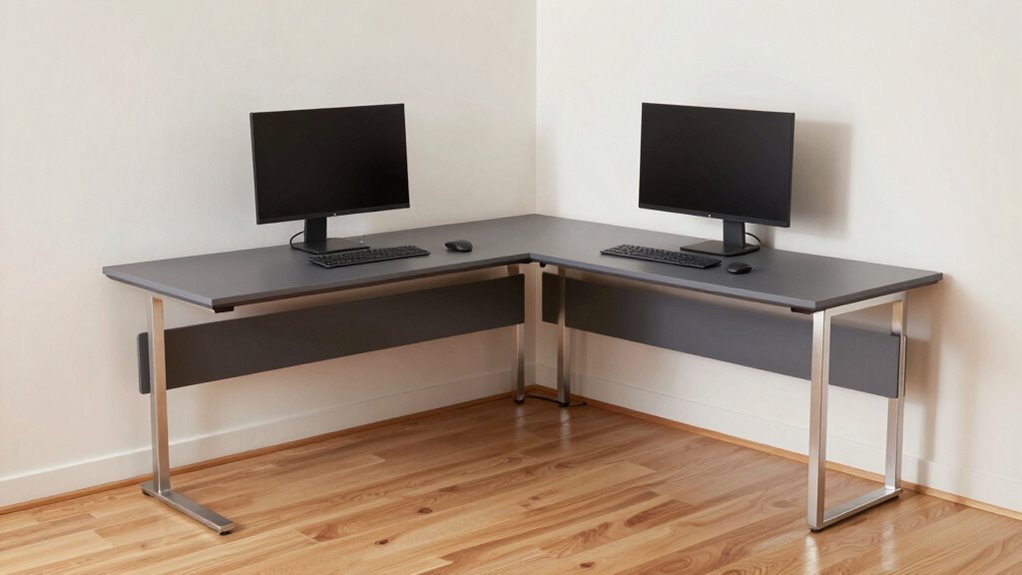
You picture it: two glowing monitors perfectly angled, cables tucked away, your workspace stretching into a sleek L-shaped command center.
The right L-shaped desks for dual monitor setups offer both space and smart design to keep clutter under control.
These desks provide ample surface area while supporting an ergonomic layout that adjusts to your posture.
Look for features like height adjustability and built-in cable management—key details that make L-shaped desks for dual monitor setups stand out.
| Aheaplus L-Shaped Gaming Desk with LED Lights |  | Best for Gamers | Shape: L-shaped | Reversible Configuration: Reversible (hutch left/right) | USB Ports: 2 USB ports | VIEW LATEST PRICE | Read Our Analysis |
| HSH L-Shaped Home Office Desk |  | Most Spacious Design | Shape: L-shaped | Reversible Configuration: Reversible (shelves left/right) | USB Ports: Not specified | VIEW LATEST PRICE | Read Our Analysis |
| SEDETA L-Shaped Gaming Desk with Storage |  | Top Storage Flexibility | Shape: L-shaped | Reversible Configuration: Reversible (Hutch left/right) | USB Ports: 2 USB ports | VIEW LATEST PRICE | Read Our Analysis |
| AODK 59″ L-Shaped Gaming Desk | 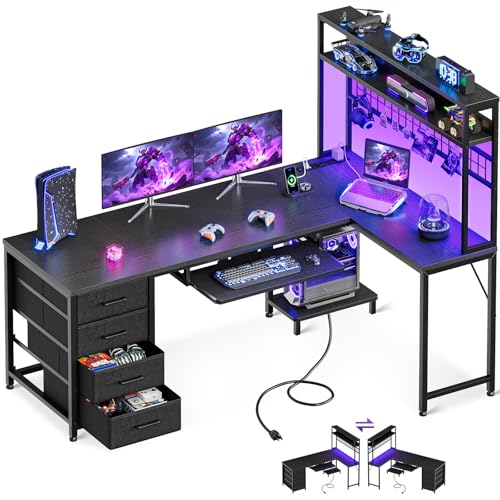 | Best for Small Spaces | Shape: L-shaped | Reversible Configuration: Reversible (left/right-handed) | USB Ports: 2 USB ports | VIEW LATEST PRICE | Read Our Analysis |
| HUANUO 63″ Dual Motor L-Shaped Standing Desk |  | Premium Standing Desk | Shape: L-shaped | Reversible Configuration: Reversible (long desktop left/right) | USB Ports: 2 USB ports (Type-A, Type-C) | VIEW LATEST PRICE | Read Our Analysis |
More Details on Our Top Picks
Aheaplus L-Shaped Gaming Desk with LED Lights
If you’re the kind of person who wants your gaming setup to do more than just hold two monitors—like, say, actually keep your peripherals charged, your headset off the floor, and your ambiance dialed in with 60,000+ LED color options—then this Aheaplus L-Shaped Gaming Desk might be the one that finally stops your workspace from looking like a post-battle zone.
You’ve got 3 power outlets and 2 USB ports—enough to run your PC, monitor, phone, headset, and a desk fan without begging outlets for mercy. The 4-tier shelves and included storage bag keep clutter at bay, while the headphone hook? Non-negotiable.
You’ll sync the app-controlled LED strip (60,000+ colors, music-reactive modes, even a timer) to match your game’s mood—why not? At 18.9″D x 48.82″W x 59.13″H, with a reversible L-shape and movable monitor stand, it fits tight spaces and supports proper posture—critical if you’re grinding for hours.
The rugged MDF top resists spills; the metal frame, cross-braced for stability, won’t wobble when you slam a headshot. Adjustable legs handle uneven floors, and while assembly takes under two hours (no degree required), the lifetime support means you’re never stuck—unless you misplace a hex key, which, let’s be honest, we’ve all done.
- Shape:L-shaped
- Reversible Configuration:Reversible (hutch left/right)
- USB Ports:2 USB ports
- Power Outlets:3 outlets
- Storage:4-tier shelves, storage bag, hook
- LED Lighting:RGB LED strip, 60,000+ colors, app control
- Additional Feature:Lifetime customer support
- Additional Feature:Movable monitor stand
- Additional Feature:X cross bar stability
HSH L-Shaped Home Office Desk
The HSH L-Shaped Home Office Desk isn’t just another bulky workstation—it’s a thoughtfully engineered solution for remote professionals, multitasking creatives, and hybrid workers who need real space for dual monitors (or more) without eating up the whole room. You get a 59.1 x 59.1-inch tabletop—plenty of real estate for your laptop, PC, notepads, and two (or three) screens—with a weight capacity of 150 lbs, so stability isn’t a concern.
The heavy-duty metal frame and MDF top feel solid, not flimsy, and at 19.7” deep, the desk tucks neatly into corners. The reversible design lets you flip the 6-drawer configuration to the left or right, depending on your room layout.
Two of those drawers are file drawers, designed to handle letter, A4, or legal-sized documents without a hitch. That long open shelf? Perfect for decor, books, or that coffee you swear you’ll finish before it gets cold.
Setup takes about an hour with clearly labeled parts and a manual that doesn’t require a PhD to decode. If it’s not your jam, the 30-day return and 12-month warranty offer peace of mind.
Is it fancy? Maybe not—but do you really need RGB lighting when you’ve got actual function?
- Shape:L-shaped
- Reversible Configuration:Reversible (shelves left/right)
- USB Ports:Not specified
- Power Outlets:Not specified
- Storage:6 drawers, long shelf, file storage
- LED Lighting:Not specified
- Additional Feature:Two large file drawers
- Additional Feature:30-Day Free Return
- Additional Feature:Symmetrical design balance
SEDETA L-Shaped Gaming Desk with Storage
Your gaming or productivity haven just got a serious upgrade with the SEDETA L-Shaped Gaming Desk—especially if dual monitors, cable clutter, and limited storage have been driving you nuts. You get a reversible design (62″, 87″, or 94.5″ setups) that tucks neatly into corners, FSC-certified wood, and flexible hutch placement—left or right—so you’re covered whether flying solo or sharing space.
The pegboard and display cabinet keep collectibles safe and within reach, while five breathable fabric drawers slash desktop chaos. You’ve got built-in power (4 outlets, 2 USB ports) and app-controlled RGB lighting with 60,000+ colors—because why not sync your desk to your playlist?
Metal frame, adjustable legs, and scratch-resistant surface mean it holds up, and if parts go missing? Free replacements. Not bad for a desk that’s equally at home in a cramped study or dual-user zone—durable, smart, and surprisingly fun, without overpromising.
- Shape:L-shaped
- Reversible Configuration:Reversible (Hutch left/right)
- USB Ports:2 USB ports
- Power Outlets:4 outlets
- Storage:5 fabric drawers, display cabinet, pegboard
- LED Lighting:RGB LED lights, 60,000+ colors, 29 modes, app control
- Additional Feature:FSC certified wood desktop
- Additional Feature:Music-sync via mic
- Additional Feature:Breathable fabric drawers
AODK 59″ L-Shaped Gaming Desk
You’re getting serious about your dual-monitor setup, and the AODK 59″ L-Shaped Gaming Desk is built for people who want productivity and flair without tripping over cables or hunting for storage.
You’ll appreciate the reversible design—left or right-handed—it adapts to your room’s flow, while the 4 deep fabric drawers and pegboard with hooks and clips keep clutter out of sight, not out of mind.
Need to type? Slide out the 23.4” keyboard tray, then tuck it away for more space—clever, right?
The built-in CPU stand reduces dust, and with 3 AC outlets, 2 USB ports, and an adjustable 10-color LED strip, you’re powered and lit—literally.
Work, study, game—this desk’s zones make multitasking feel less like juggling.
- Shape:L-shaped
- Reversible Configuration:Reversible (left/right-handed)
- USB Ports:2 USB ports
- Power Outlets:3 outlets
- Storage:4 fabric drawers, pegboard with hooks
- LED Lighting:LED strip, 10 colors/modes, remote control
- Additional Feature:Slide-out keyboard tray
- Additional Feature:CPU stand included
- Additional Feature:Remote-controlled LED modes
HUANUO 63″ Dual Motor L-Shaped Standing Desk
Looking for a heavy-duty sit-stand desk that handles dual monitors, tangled cables, and long workdays without breaking a sweat? The HUANUO 63″ Dual Motor L-Shaped Standing Desk’s got your back—adjusting smoothly from 28″ to 46″ via dual carbon steel motors (rated for 50,000 cycles) and holding up to 220 lbs.
Its L-shape fits neatly in corners, with the long desktop positioned on the left or right—your call. You’ll love the 3 memory presets, built-in power strip (2 outlets, 2 USB ports), and smart cable management tray—because who actually enjoys untangling cords?
- Shape:L-shaped
- Reversible Configuration:Reversible (long desktop left/right)
- USB Ports:2 USB ports (Type-A, Type-C)
- Power Outlets:2 outlets
- Storage:Cable tray, side storage hooks
- LED Lighting:Not specified
- Additional Feature:Dual motors for lifting
- Additional Feature:3 memory height presets
- Additional Feature:Cable management tray included
Factors to Consider When Choosing L-Shaped Desks for Dual Monitors

You’ll want to size up your space before committing—L-shaped desks typically need at least 70″ x 50″ of floor area, and skimping here means you’ll constantly bump into corners or lose legroom. Think about how high your dual monitors sit, since you’ll need at least 32″ of vertical clearance (or more with monitor arms), and don’t forget cable management: without built-in grommets or trays, your setup could turn into a spaghetti junction by week two. Is it a dealbreaker if the desk doesn’t adjust height? Maybe not—unless you’ve felt the sweet relief of standing during afternoon slump, then you’ll know why dual motors and programmable presets (hello, 25″ to 48″ range) are worth the extra cash.
Size and Fit
A single L-shaped desk can transform your workspace—especially when juggling dual monitors—but getting the size right means balancing real estate, reach, and weight limits without turning your corner into a cluttered compromise. You’ll want at least 59 inches of width, but ideally 87 inches or more—some stretch to 94.5 inches—to comfortably fit two screens, your keyboard, and still leave room for a notebook or coffee.
Depth matters too: aim for 18.9–19.7 inches so your monitors don’t teeter toward the edge. If your space is tight, a 59.1″ x 59.1″ footprint tucks neatly into corners while still offering usable surface on both legs.
Reversible designs let you shift storage or a hutch to maximize space where you need it. Just don’t forget: your desk should hold 150–220 lbs—enough for screens, mounts, and maybe that heavy-duty mechanical keyboard you swear by.
Monitor Clearance
While not every L-shaped desk plays well with dual monitors, the right one gives you room to breathe—literally—by offering at least 18.9 to 19.7 inches of depth so your screens sit flush, not teetering over the edge like they’re auditioning for a cliffhanger drama.
You’ll want at least 59″ to 87″ of total span to fit both displays side by side without crowding, especially if you’re eyeing larger than 27-inch monitors. Check that the corner design doesn’t eat into your usable surface—some curves or support beams sabotage precious inches.
Look for a flat, unobstructed top, ideally with optional pegboards or shelves mounted *behind* your line of sight, not jutting into monitor real estate. A movable stand or reversible hutch? Huge win—it lets you fine-tune viewing angles without craning your neck.
And don’t forget vertical clearance: leave 2–3 inches above the desk edge so tilting or swiveling doesn’t mean “Oops, there goes my display.”
Cable Management
Taming the spaghetti swirl of cords behind your dual monitor fortress starts with smart cable management built right into the desk’s design. Because no one’s impressed by a sleek setup when the backside looks like a tech junk drawer exploded.
You’ll want a cable management tray or channel underneath the desktop to hide power strips and bundle excess cord length. Cut down clutter by up to 60% with one simple addition.
Add built-in cable clips along the desk’s edge or legs, and you’ve got a clean routing system that keeps HDMI, USB, and power cables off the floor. Look for grommets or cutouts at the L-corner; they let you feed monitor cables straight down to a central hub without tripping hazards.
Maybe your PC stays under the desk? A recessed CPU cubby reduces cable crossover between work zones while improving airflow. And honestly, who wants to crawl under the desk just to charge a phone?
Built-in power outlets and USB ports near the front edge make plugging in easy—no more cord juggling.
Storage Options
You’re not just setting up two monitors—you’re building a command center, so smart storage options keep your workflow smooth and your surface clear.
Look for L-shaped desks with 4-tier open shelves or a long shelf plus drawers—they’re ideal for organizing peripherals without sacrificing reach or style.
Need to stash cables, tools, or notebooks? Integrated fabric drawers (4–5 deep ones, usually) offer soft, dust-free access and a surprisingly sleek finish.
Wondering where to hang your headphones or favorite LED strip? A pegboard with hooks—right on the desk frame—gives you flexible, visible spots for everyday items.
Got paperwork piling up? Built-in file drawers (letter, A4, or legal size) cut desktop clutter dramatically.
And if you’ve got small decor or backup drives, a display cabinet with doors and a pegboard backing protects from dust while keeping things handy.
Smart storage isn’t clutter hiding—it’s clarity in action.
Adjustable Height
Adjusting your desk height on the fly isn’t just a luxury—it’s a lifeline when you’re juggling dual monitors and shifting between deep-focus sprints and quick stand-up checks. You’ll want a desk with a broad height range—say, 28″ to 46″—so whether you’re sitting cross-legged or standing tall, your screens stay at eye level.
Go for a dual-motor system; it lifts heavier loads smoothly, which matters when you’ve got two monitors, a keyboard tray, and who knows how many coffee mugs. Check the weight limit—some desks handle up to 220 lbs, plenty for most setups.
With 50,000 lift cycles, you’re not just buying a desk, you’re investing in years of reliable motion. Use memory presets—why fumble each time? Just press a button and your monitors snap into perfect alignment.
Isn’t that better than playing height-adjustment roulette every morning?
Durability and Build
You’ve got your ideal height dialed in—shouldn’t your desk hold up just as well over time? A sturdy L-shaped desk typically pairs a rugged metal frame with a dense MDF or particleboard top to resist warping, especially under the 150–220 lbs your dual monitors, keyboard, and gear likely weigh.
Look for scratch-resistant surfaces and moisture-repellent coatings—they’re not just convenient, they extend lifespan. Adjustable leg pads and an X-cross bar? Non-negotiables. They combat wobble and adapt to uneven floors, keeping things stable for years, not months.
Modular or reversible designs help too, letting you reconfigure without stressing joints. Tight, secure connections at assembly points mean less wear over time—critical if you’re tweaking layout or moving parts often.
Sure, no desk is indestructible, but with smart materials and thoughtful engineering, yours won’t just survive daily drudgery, it’ll handle it like it’s built for one.
Frequently Asked Questions
Can I Assemble the Desk Without Tools?
You can’t assemble it without tools—most L-shaped desks need screws and an Allen wrench. You’ll put it together step by step, but don’t worry, it’s doable in under an hour with basic tools and the included instructions.
Are the LED Lights Customizable in Color?
Yeah, you can customize the LED lights’ color to match your vibe. Just grab the remote or app—depends on the model—and switch hues anytime. No extra tools needed, and setup’s a breeze. You’ll have full control over brightness and color modes in seconds.
Is the Desk Suitable for Tall Users?
Yes, you’ll stretch tall and free—the desk’s like a redwood, built for your reach. You’ll command space, stay comfy, and own every task, no hunching needed. It’s your throne, not just furniture.
Does It Come With a Cable Management Tray?
Yes, it comes with a cable management tray, so you can keep all your cords organized and out of the way. You’ll set it up quickly and love how tidy your workspace stays—no more tangled wires slowing you down or cluttering your view.
Can I Add a Keyboard Tray Later?
Oh, sure—you can add a keyboard tray later, because clearly, the desk was just *begging* for clutter. But check compatibility first; slapping on extras willy-nilly won’t fix poor ergonomics or your overpacked workspace.
Conclusion
You’re not just setting up two monitors—you’re crafting a command center where 63 inches of desk real estate (like the HUANUO’s motorized L-shape) meets pegboard order and reversible flexibility, all while standing or sitting with ergonomic precision; sure, assembly’s a puzzle, but isn’t that part of the thrill? Efficiency, space, and a dash of gamer flair blend seamlessly—even your cables behave.